
Cross-platform · Size chart
Pick the surface, then crop to that artboard
There is no single “social media size.” Feed posts, covers, stories, and thumbnails use different ratios. Use the chart to choose, then crop before you upload.
Last verified 2026-09-06 Practical major social networks sizes observed in community UI as of 2026-09-06. Not an official single-pixel mandate—preview on-device before you publish.
Social media image sizes at a glance
Common surfaces with practical pixels. Open a guide for safe zones and a dedicated crop—reuse the photo, not one finished export from another network.
| Platform | Surface | Size | Ratio | Guide |
|---|---|---|---|---|
| Feed post Default tall feed; square & landscape also on that guide. | 1080 × 1350 | 4:5 | Open | |
| Stories / Reels Full-screen; protect top/bottom chrome. | 1080 × 1920 | 9:16 | Open | |
| Cover photo Phones re-crop the center; avatar overlaps. | 1640 × 624 | ~2.63:1 | Open | |
| Feed post | 1080 × 1350 | 4:5 | Open | |
| YouTube | Thumbnail | 1280 × 720 | 16:9 | Open |
| YouTube | Channel banner Safe zone matters more than the canvas label. | 2560 × 1440 | 16:9 | Open |
| X (Twitter) | Header banner | 1500 × 500 | 3:1 | Open |
| Personal cover | 1584 × 396 | 4:1 | Open | |
| TikTok | Video / cover | 1080 × 1920 | 9:16 | Open |
| Pin | 1000 × 1500 | 2:3 | Open | |
| Threads | Post | 1080 × 1350 | 4:5 | Open |
| Open Graph | Link share image URL unfurls—not a profile cover. | 1200 × 630 | ~1.91:1 | Open |
-
Instagram
Feed post
1080 × 1350 · 4:5
Default tall feed; square & landscape also on that guide.
-
Instagram
Stories / Reels
1080 × 1920 · 9:16
Full-screen; protect top/bottom chrome.
-
Facebook
Cover photo
1640 × 624 · ~2.63:1
Phones re-crop the center; avatar overlaps.
-
Facebook
Feed post
1080 × 1350 · 4:5
-
YouTube
Thumbnail
1280 × 720 · 16:9
-
YouTube
Channel banner
2560 × 1440 · 16:9
Safe zone matters more than the canvas label.
-
X (Twitter)
Header banner
1500 × 500 · 3:1
-
LinkedIn
Personal cover
1584 × 396 · 4:1
-
TikTok
Video / cover
1080 × 1920 · 9:16
-
Pinterest
Pin
1000 × 1500 · 2:3
-
Threads
Post
1080 × 1350 · 4:5
-
Open Graph
Link share image
1200 × 630 · ~1.91:1
URL unfurls—not a profile cover.
Browser crop · stays on your device
Crop a social image from this chart
1080 × 1350
Add a photo to crop
Upload a photo—or try the sample—then pick a preset from the chart above.
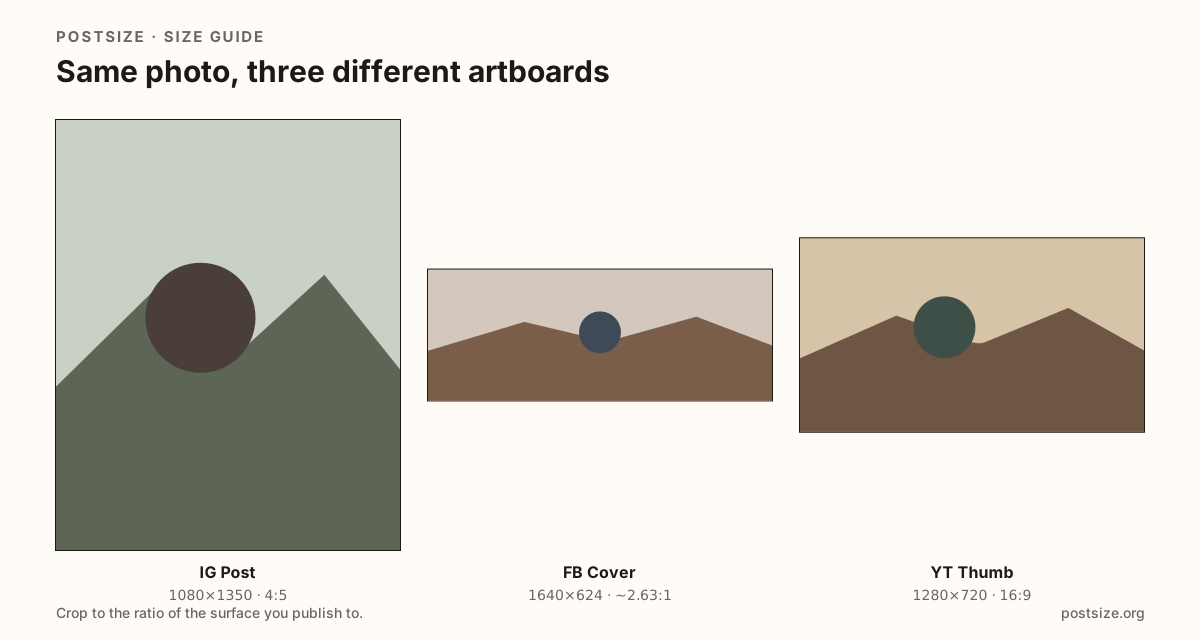
Same photo, different frames
A single pixel chart is only half the job. Pick the wrong row and faces go soft, logos clip, or empty bars appear after upload. Use the numbers here to choose a surface, then open that guide—or crop on this page—so the export matches where the image will sit.
Each row is its own artboard. A Facebook cover is a wide strip phones re-frame through the center. An Instagram feed post wants taller 4:5 presence. Stories and Reels fill 9:16 under stickers and buttons. YouTube thumbnails are 16:9 click cards. Open Graph images are link previews—not profile headers.
Reuse the original photo when you can. Export a fresh crop for each network instead of stretching a finished cover into a feed slot. When you need every avatar or every cover in one place, open the profile-picture or cover-photo charts linked below.
Quick picks
Match the job to the row so you do not export the wrong ratio.
- Photo people will scroll past on Instagram or Facebook → Feed post at 4:5 (1080×1350).
- Refreshing a Page or profile header → Cover / banner row for that network—never a 1200×630 OG card.
- 24-hour stickers or vertical discovery → Stories / Reels / TikTok at 1080×1920.
- Video click-through on YouTube → Thumbnail 1280×720 with a bold face or title in the center.
- Shared URL unfurl → Open Graph 1200×630 (see also the link-preview chart).
- Need every avatar or every cover listed → Profile picture sizes or Cover photo sizes guides.
Frequently asked questions
What is the standard social media image size?
There is not one. Practical defaults many teams start with are 1080×1350 (4:5) for feed photos, 1080×1920 (9:16) for Stories/Reels, and 1200×630 for link previews—but covers and banners use completely different ratios.
Can I use one export for Instagram, Facebook, and LinkedIn?
Only when the ratio matches. A 4:5 feed photo can often travel between Instagram and Facebook feeds. LinkedIn covers, X headers, and YouTube banners need separate crops.
Do these numbers change?
Layouts shift. Each guide shows a last-verified date and labels practical sizes when a platform does not publish a single official pixel. Preview on-device after upload.
Can I crop from this page?
Yes. Use the crop tool below the chart, pick the matching preset, then download and publish yourself. Nothing is uploaded to PostSize for cropping.