
Facebook · Image sizes
Pick the Facebook surface you are publishing to
Cover, feed post, Story, profile, Group, Event, and link preview are different jobs. Open the guide that matches where the image will sit, then crop with the safe zone before you upload.
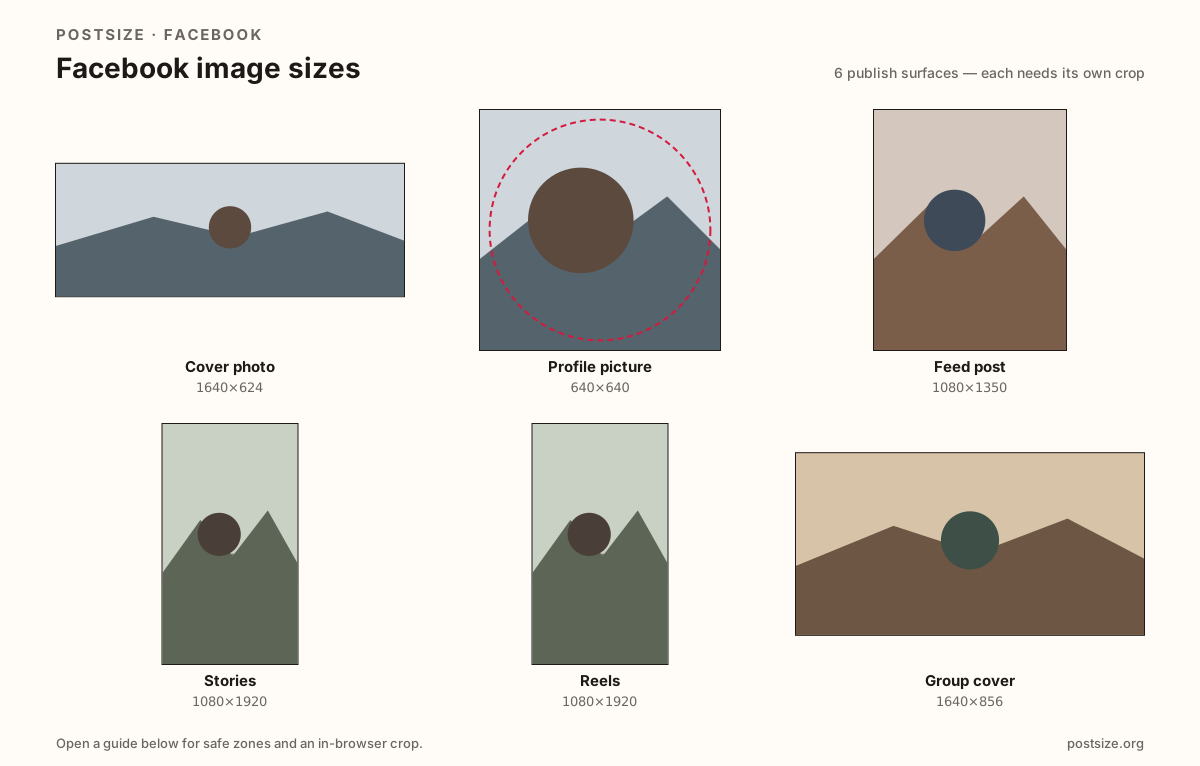
Sizes on Facebook
Open a guide for exact pixels, safe zones, and an in-browser crop for that surface.
Cover photo
1640 × 624
Desktop strip vs mobile center crop, avatar overlap, live dual preview.
Profile picture
640 × 640
Circular avatar for timeline, comments, and Messenger—keep the face inside the circle.
Feed post
1080 × 1350
4:5 portrait for organic photos and carousels that share one ratio.
Stories
1080 × 1920
Full-screen 9:16 with top/bottom UI clearance for stickers and replies.
Reels
1080 × 1920
Vertical Reels frame—same pixels as Stories, different chrome and discovery.
Group cover
1640 × 856
Taller Group banner—do not reuse a Page cover export.
Event cover
1920 × 1005
~1.91:1 event header for invites and the event page.
Link preview (OG)
1200 × 630
Shared URL cards only—never a cover substitute.
Marketplace listing
1200 × 1200
Square listing photos for Marketplace—not a feed post or Page cover.
Why Facebook needs more than one export
A Page cover is a wide banner that phones re-crop through the center. A feed photo wants taller 4:5 presence. A Story fills the screen under stickers and reply UI. Reels use the same 9:16 pixels with a different chrome stack. Your profile photo is a circle on top of the cover. Groups and Events use their own banners. One “Facebook size” does not exist—only the surface you are filling.
Most soft or clipped uploads happen when people reuse the wrong file: an Open Graph 1200×630 as a cover, a cover strip as a post, or a Story still squeezed into the feed. Start from the guide below so pixels and safe zones match the real layout.
Each guide includes exact pixels, a checklist, and an in-browser crop. Nothing is uploaded to a server—you download the JPG or PNG and publish on Facebook yourself.
Quick picks
Match the task to the guide so you do not export the wrong ratio.
- Refreshing a Page or profile header → Cover photo, then check Profile picture contrast on top of it.
- Photo people will scroll past in the News Feed → Feed post at 4:5, not a wide link-preview crop.
- 24-hour vertical frame with stickers → Stories at 1080×1920; keep headlines out of the chrome bands.
- Short-form vertical for Reels discovery → Reels; re-check chrome even if you reuse a Story master.
- Only changing the circular face next to your name → Profile picture; do not stretch a cover into that slot.
- Updating a Group or Event banner → use those guides; Page cover pixels will not fit cleanly.
- Selling on Marketplace → Marketplace listing square; do not reuse a cover strip.
Frequently asked questions
What is the standard Facebook image size?
There is no single size. Covers are ~1640×624, feed photos often 1080×1350, Stories 1080×1920, and profile photos a square (try 640×640) shown as a circle.
Can I use one image for cover and post?
You can reuse the photo, but not the finished export. Re-crop to each ratio so mobile cover crops and feed framing stay intentional.
Is 1200×630 a Facebook cover size?
No. That ratio is for link previews. Use the Cover photo guide for the banner behind your avatar, or the Link preview guide for og:image.
Do these sizes work for personal profiles and Pages?
The pixel targets are the practical defaults most people need. Page-only options like cover video still follow cover proportions for still frames—see the Cover guide notes.