
Recommended upload (2×)
Recommended1640×624 ~2.63:1
Best export for clear covers on phones and modern screens. Same ratio as desktop display.
Use in toolFacebook · Image size
One upload, two crops. Get the pixels Facebook actually uses, keep faces in the mobile center, then download a clear file without leaving this page.
Browser crop · stays on your device
1640 × 624
Add a photo to crop
Upload a wide photo—or try the sample—then drag so faces stay in the mobile center before you download.
Live preview
Upload a photo above to compare both frames.
Publish at 2× when you can. Desktop and mobile rows explain what viewers see—not separate uploads. OG is listed so you do not confuse it with a cover.
Export this for Facebook upload.
1640×624 ~2.63:1
Best export for clear covers on phones and modern screens. Same ratio as desktop display.
Use in tool| Asset | Pixels | Ratio | Notes | Action |
|---|---|---|---|---|
| Recommended upload (2×) Recommended | 1640×624 | ~2.63:1 | Best export for clear covers on phones and modern screens. Same ratio as desktop display. | Use in tool |
Reference sizes and crops—not always separate upload files.
820×312 ~2.63:1
What large screens show for profiles and Pages. Use for a quick 1× check.
Use in tool640×360 16:9
Approximate phone frame only. Live Facebook still re-crops from one wide upload.
Use in tool| Asset | Pixels | Ratio | Notes | Action |
|---|---|---|---|---|
| Desktop display | 820×312 | ~2.63:1 | What large screens show for profiles and Pages. Use for a quick 1× check. | Use in tool |
| Mobile display (preview) | 640×360 | 16:9 | Approximate phone frame only. Live Facebook still re-crops from one wide upload. | Use in tool |
Listed so you do not confuse them with the size on this page.
1200×630 ~1.91:1
Not a cover—only for shared link thumbnails. Do not upload this as your banner.
Not available in the crop tool
| Asset | Pixels | Ratio | Notes | Action |
|---|---|---|---|---|
| Link preview (OG) Wrong slot | 1200×630 | ~1.91:1 | Not a cover—only for shared link thumbnails. Do not upload this as your banner. | — |
Facebook keeps one cover file, then shows a wide strip on desktop (~820×312) and a tighter center crop on phones (~640×360). Edges that look fine on a monitor can vanish on mobile.
Correct dimensions keep the image clear. A center safe zone—and the live Desktop vs mobile preview in the tool—keeps the message readable everywhere.
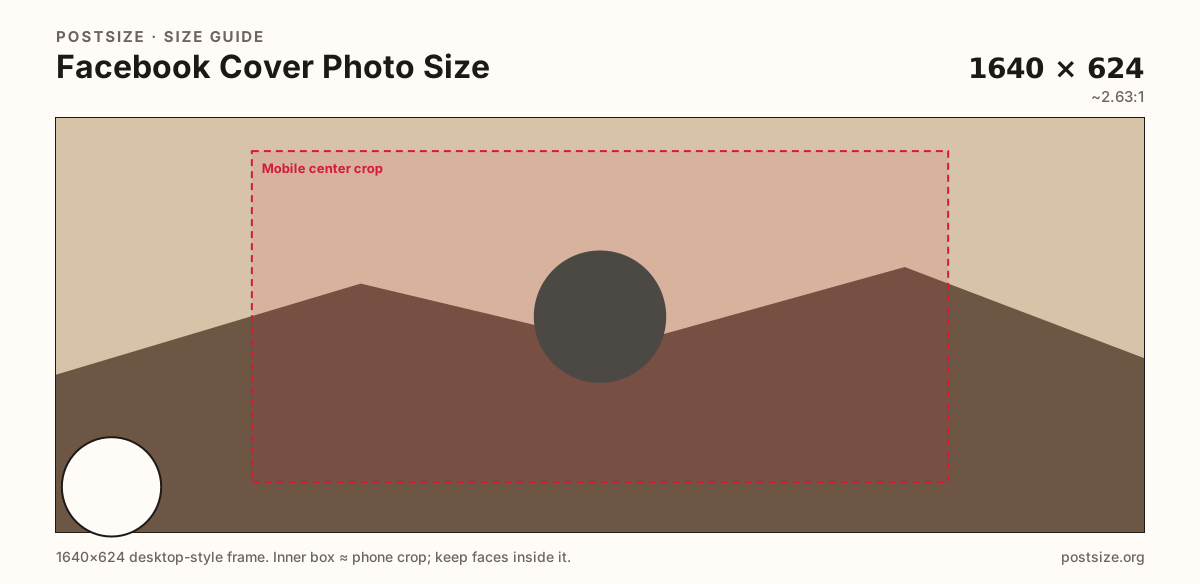
Same wide frame—placement decides whether phones still see your message.
Tick these off against your crop preview—nothing is saved.
Similar-looking slots often use different ratios—do not reuse one export for all of them.
1640 × 624 upload
This page. Display ~820×312; phones re-crop the center.
1640 × 856 typical
Taller than profile covers—do not reuse a profile export.
1920 × 1005 typical
Closer to ~1.91:1. Different artboard than a Page banner.
1200 × 630
Shared URL thumbnail only—never a cover substitute.
| Surface | Typical size | Note |
|---|---|---|
| Profile / Page cover | 1640 × 624 upload | This page. Display ~820×312; phones re-crop the center. |
| Group cover | 1640 × 856 typical | Taller than profile covers—do not reuse a profile export. |
| Event cover | 1920 × 1005 typical | Closer to ~1.91:1. Different artboard than a Page banner. |
| Link preview (OG) | 1200 × 630 | Shared URL thumbnail only—never a cover substitute. |
Desktop keeps more width. Mobile keeps a taller relative window through the middle, so left and right margins are optional for phone viewers.
The frames below are a reminder. For a real photo, use the live dual preview under the crop tool as the source of truth.
Photos usually look best as JPG; hard-edged logos or type can stay PNG. Prefer sRGB so colors do not shift after upload.
Many business Pages can use a short cover video instead of a still. Personal profiles usually stay on a photo—confirm in Facebook for your account type before you produce a clip.
Safe zones matter more than the raw pixel number. Desktop keeps a wide strip; phones keep a taller center window; the circular profile photo always owns the lower-left. Walk the cover once with that mental model before you hit upload.
If a face, logo, or headline only works on a wide monitor preview, it is not finished. Use the live Desktop vs mobile preview in the crop tool, then open the published profile on a phone with the avatar visible.
From this download to a live upload in a few minutes.
Download the JPG from the tool (prefer 1640×624).
On Facebook, open your profile or Page → camera / edit cover.
Upload the file, then nudge the position once more in Facebook’s editor if needed.
Check the result on your phone—confirm the center still reads clearly.
Plan for 820×312 on desktop and upload 1640×624 so it stays clear. Phones show a tighter center crop around 640×360—keep critical content centered.
Keep faces, logos, and headlines in the horizontal center so mobile’s tighter crop still shows them. Leave the lower-left clear for the profile photo, and keep Page CTAs from fighting important art in the lower-right.
For profiles and Pages, yes—both names mean the same wide header. It is not the 1200×630 Open Graph image used when sharing links.
Roughly 640×360 with a centered crop. You still upload one wide image; Facebook re-frames it—there is no separate mobile upload.
Desktop shows more width; mobile keeps the middle. Edges drop off, and the profile photo covers the lower-left. Use the live preview on this page before publishing.
Same aspect ratio. Prefer 1640×624 on high-density screens; 820×312 is fine for a quick 1× check if the source is already soft.
JPG for photos, PNG for clean logos or type. Export sRGB and keep the file reasonably light for mobile networks.
Pages often support cover video (about 20–90 seconds, MP4). Profiles usually use a still. Design the first frame with the same center safe zone.
No. Groups and Events use different dimensions than profile/Page covers. See the Surfaces table on this page for typical sizes.