
WhatsApp · Image sizes
Size WhatsApp Status, Channel, catalog, and circles separately
Status fills the phone under progress UI. Channels need a wide cover and a circle icon. Catalog tiles are square product stills. Profile and group icons are tiny chat circles—crop each on purpose.
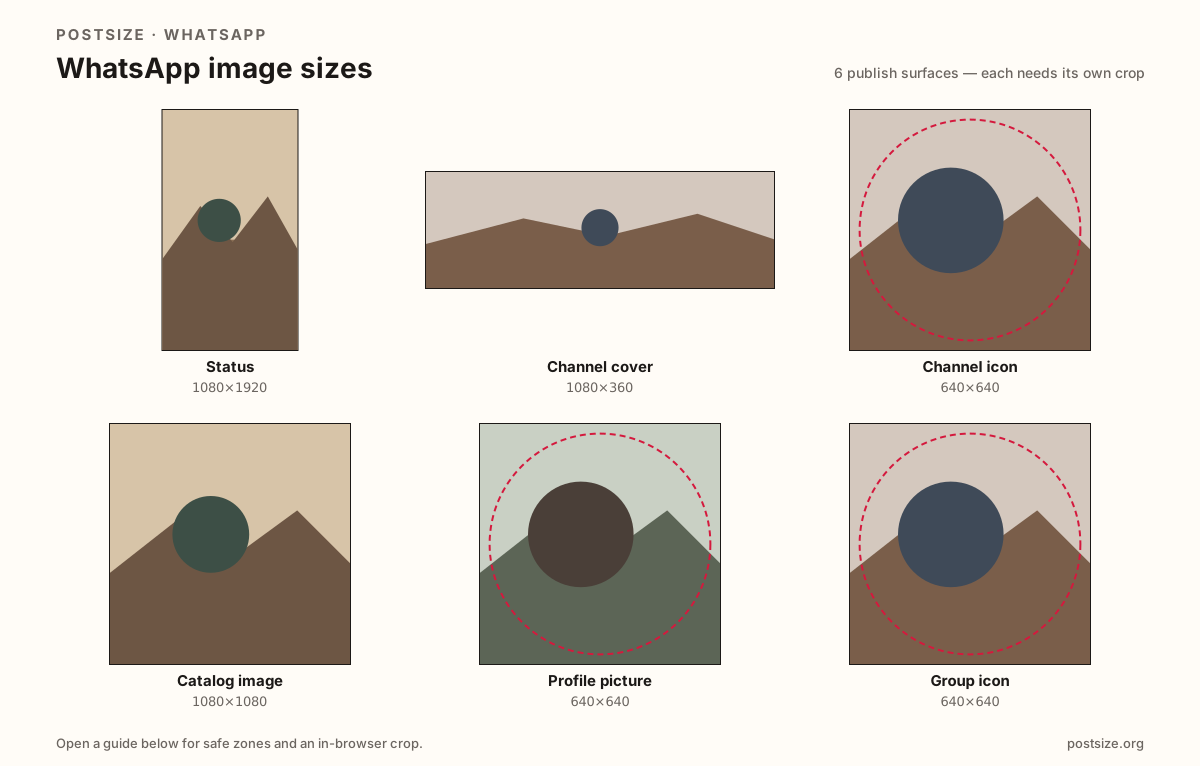
Sizes on WhatsApp
Open a guide for exact pixels, safe zones, and an in-browser crop for that surface.
Status
1080 × 1920
9:16 frame with top/bottom clearance for Status chrome.
Channel cover
1080 × 360
3:1 Channel header—optional 1280×720 community note on the page.
Channel icon
640 × 640
Circular Channel mark—same habit as group icons.
Catalog image
1080 × 1080
Business catalog product tile—min ~500×500 noted.
Profile picture
640 × 640
Circular avatar for chats and Status rings—tight face, quiet corners.
Group icon
640 × 640
Group chat circle—same pixels as profile, different brand job.
Full-screen Status vs Channel chrome vs catalog tiles
WhatsApp Status draws progress, name, and reply controls over your pixels—especially the top and bottom bands. A still must keep the hook in the clear center. Horizontal photos with huge bars look unfinished next to native vertical frames.
Channels add two more artboards: a practical 1080×360 (3:1) cover and a 640×640 Channel icon (same circle habit as group icons). Business catalogs prefer 1080×1080 product squares—treat ~500×500 as a soft floor, not the creative brief.
Profile pictures and group icons remain separate square jobs. Do not stretch a 9:16 Status into a Channel cover or a catalog tile. Each guide includes practical pixels, a checklist, and an in-browser crop.
Quick picks
Match the task to the guide so you do not export the wrong ratio.
- 24-hour vertical frame → Status at 1080×1920; keep headlines out of the chrome bands.
- Dressing a WhatsApp Channel → Cover at 1080×360 plus Channel icon at 640×640.
- Business catalog product tile → Catalog image at 1080×1080.
- Only the circle in chat lists → Profile picture; fill the guide with one clear face.
- Updating a group chat mark → Group icon at 640×640; prefer a bold simple mark.
- Repurposing an Instagram Story → Same pixels as Status, different chrome—re-check WhatsApp.
Frequently asked questions
What is the WhatsApp Status size?
1080×1920 (9:16). Design stills so progress, name, and reply UI do not cover the subject.
What size is a WhatsApp Channel cover?
A practical primary size is 1080×360 (3:1). Some teams also use 1280×720 as a community alternate—preview the live Channel.
What size is a WhatsApp Channel icon?
640×640 shown as a circle—the same practical habit as group icons, different brand job.
What size should WhatsApp catalog images be?
Prefer 1080×1080. Many Business flows tolerate smaller squares—treat about 500×500 as a soft minimum.
What size is a WhatsApp profile picture?
A square shown as a circle—640×640 is a strong upload target. Smaller soft files look blurry in chats.
Can I use an Instagram Story on WhatsApp Status?
As a starting file, yes—both are 9:16—but re-check WhatsApp’s caption and chrome before you publish.