
Patreon · Image sizes
Pick the Patreon surface you are publishing to
Profile photos, page covers, and post images are three different uploads. Open the guide that matches the slot, keep the safe zone clear, then download a clear file.
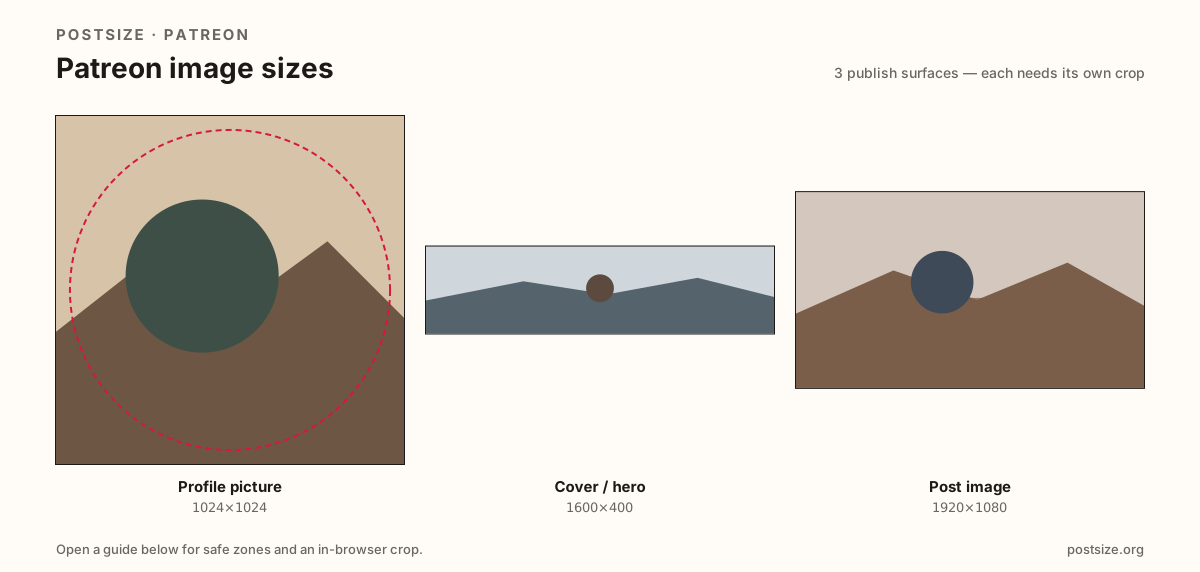
Sizes on Patreon
Open a guide for exact pixels, safe zones, and an in-browser crop for that surface.
Creator page identity vs member feed cards
Your profile photo is a circle on the creator page and in feeds—Patreon recommends at least 1024×1024. The cover is a short 4:1 hero (1600×400) with avatar overlap. Posts prefer a clean 16:9 still at 1920×1080.
Stretching a LinkedIn or Facebook cover into Patreon, or pasting the cover into a post, is how soft and letterboxed pages happen. Reuse photography if you want—export each ratio separately.
Each guide includes practical pixels, a checklist, and an in-browser crop. Nothing is uploaded to a server—you download the file and publish on Patreon yourself.
Quick picks
Match the task to the guide so you do not export the wrong ratio.
- Only the circle beside your name → Profile picture at 1024×1024.
- Refreshing the page hero → Cover at 1600×400; leave the avatar pocket quiet.
- Attaching art to a member post → Post image at 1920×1080.
- Coming from LinkedIn or X → Re-crop; those banners are not Patreon’s 4:1 cover.
Frequently asked questions
What size is a Patreon cover?
1600×400 (4:1) is the practical recommended cover / hero size. Keep logos clear of the avatar overlap.
What size is a Patreon profile picture?
Patreon recommends a square at least 1024×1024. It displays as a circle.
What size should Patreon post images be?
1920×1080 (16:9) is the recommended post-feed size for a clean card without bars.
Can I crop Patreon sizes in the browser?
Yes. Every guide on this hub includes an in-browser crop—files stay on your device until you download and upload to Patreon yourself.