
Ko-fi · Image sizes
Pick the Ko-fi surface you are publishing to
Page covers are short 4:1 strips; profile photos are circles. Crop each before supporters land on your page.
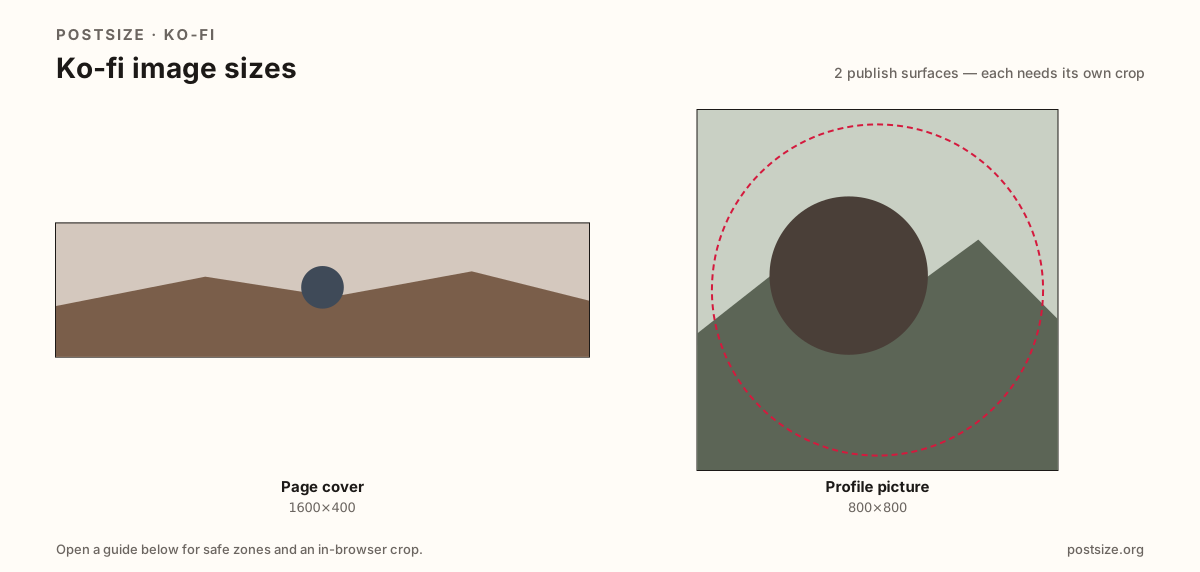
Sizes on Ko-fi
Open a guide for exact pixels, safe zones, and an in-browser crop for that surface.
Tip-page billboards vs creator circles
A practical 1600×400 cover keeps logos out of the avatar overlap and readable on phones.
Profile pictures want 800×800 circle-safe squares—faces centered, quiet backgrounds.
Patreon uses a similar cover habit; re-crop and preview on Ko-fi before you migrate art.
Quick picks
Match the task to the guide so you do not export the wrong ratio.
- Page header strip → Cover at 1600×400.
- Only the circle → Profile picture at 800×800.
- Quiet the avatar pocket on the cover.
- Coming from Patreon → Re-preview on Ko-fi.
Frequently asked questions
What size is a Ko-fi cover?
A practical page cover is 1600×400 (4:1). Keep logos out of the avatar overlap.
What size is a Ko-fi profile picture?
A practical upload is 800×800, shown as a circle—center the face.
Are these official Ko-fi sizes?
No. Practical community targets as of 2026-08-25. Preview before you publish.
Can I crop Ko-fi sizes here?
Yes. Every guide on this hub includes an in-browser crop—files stay on your device.