
Vertical video / cover still
Recommended1080×1920 9:16
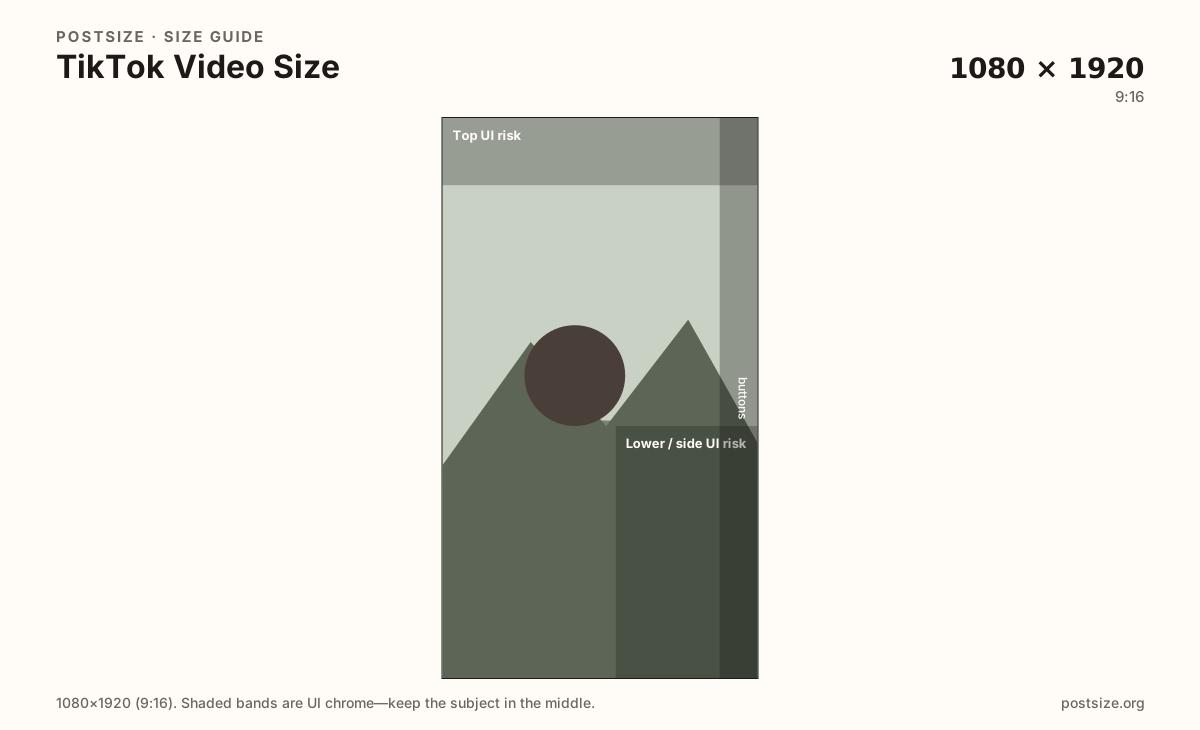
Standard TikTok frame for video and cover images. Design around on-screen UI chrome on both sides and the lower band.
Use in toolTikTok · Image size
TikTok is full-screen 9:16. Keep faces out of the left/right chrome and caption stack, then export a 1080×1920 cover frame in your browser.
Browser crop · stays on your device
1080 × 1920
Add a photo to crop
Upload a vertical frame—or try the sample—then keep the subject clear of UI risk bands before you download.
Design the mid-frame. Username, captions, and action buttons cover the right side and lower band—left edge UI can steal space too.
Export this for TikTok upload.
1080×1920 9:16
Standard TikTok frame for video and cover images. Design around on-screen UI chrome on both sides and the lower band.
Use in tool| Asset | Pixels | Ratio | Notes | Action |
|---|---|---|---|---|
| Vertical video / cover still Recommended | 1080×1920 | 9:16 | Standard TikTok frame for video and cover images. Design around on-screen UI chrome on both sides and the lower band. | Use in tool |
TikTok draws captions, sounds, and action buttons over your pixels—especially along the right edge and across the lower third. A cover still or opening freeze-frame must survive that chrome, or the hook disappears under Like and Share.
Export 1080×1920 (9:16) and place the subject in the clear center-left band. Horizontal footage with huge black bars wastes the screen and looks unfinished next to native vertical clips.
Instagram Reels and Stories use the same pixel count, but their button stacks and caption layouts differ. Always re-check TikTok’s chrome before you publish the same master file on every app.
This tool crops still cover frames. Match the same safe zone when you export video from your editor so the first second and the chosen cover both keep the face readable with captions on.
Same 9:16 frame—captions and the right-side button stack hide edge-hugging subjects.
Tick these off against your crop preview—nothing is saved.
Similar-looking slots often use different ratios—do not reuse one export for all of them.
1080 × 1920
This page. Full-screen vertical with UI overlays.
200 × 200 (try 400×400)
Small circular avatar—separate square export.
1080 × 1920
Same pixels; different chrome—re-check before reuse.
1080 × 1920
Same ratio; story UI differs from TikTok buttons.
| Surface | Typical size | Note |
|---|---|---|
| TikTok video / cover still | 1080 × 1920 | This page. Full-screen vertical with UI overlays. |
| Profile photo | 200 × 200 (try 400×400) | Small circular avatar—separate square export. |
| Instagram Reels still | 1080 × 1920 | Same pixels; different chrome—re-check before reuse. |
| Facebook / IG Story frame | 1080 × 1920 | Same ratio; story UI differs from TikTok buttons. |
The right edge holds the familiar stack: profile, like, comment, save, share. The lower band holds captions and sound credits. Interactive stickers and usernames can also claim space along the left and top depending on the client.
Treat those zones as keep-outs for faces and primary text. Put the person and the hook in the open center-left mid band so the freeze-frame still reads when every overlay is on. Designing only for a clean editor preview is how hooks get buried on publish day.
This tool crops still cover frames as JPG or PNG. Match the same 1080×1920 safe zone when you export H.264/MP4 (or your editor’s TikTok preset) for the moving video. Follow in-app length and file-size limits inside TikTok.
1080×1920 is shared with Reels and many Stories. Button placement and caption styles are not. A frame that clears Instagram chrome can still fail under TikTok’s right-side stack.
Upload a vertical still, drag until the subject clears both UI risk guides, then download. Processing stays on your device. Mirror the same framing when you export the video.
From this download to a live upload in a few minutes.
Download the 1080×1920 JPG for a cover still—or match this framing in your video export.
Upload the video to TikTok and select or replace the cover frame if the app allows.
Add captions and stickers only after you confirm the subject is still visible.
Preview on your phone in the For You–style full screen before posting.
If the hook sits under chrome, re-crop the still (and adjust the video framing) then upload again.
1080×1920 pixels (9:16) is the standard full-screen vertical frame. Keep subjects out of the side and lower UI chrome.
Keep it mid-frame in the clear band—away from the right-side buttons and the bottom caption stack. Left-edge UI can steal space too.
Same 1080×1920 pixels. Always re-check TikTok’s chrome before you publish a file designed for another app.
It crops cover stills. Match the same framing and safe zone when you export video from your editor.
JPG for photographs, PNG for hard-edged graphics. Prefer sRGB either way.
The right stack and lower captions are drawn on top of your pixels. Move the subject center-left and keep hooks out of those risk bands.
TikTok may accept it, but full-screen vertical is the native experience. Landscape usually means letterboxing—reframe to 9:16 when you can.
The cover still uses the same 1080×1920 (9:16) frame as the video. Crop the subject clear of the right-side buttons and lower caption stack, then set that still as the cover in TikTok.