
Mastodon · Image sizes
Pick the Mastodon surface you are publishing to
Avatars, profile headers, and post attachments are three different uploads. Open the matching guide—federated instances can change file limits and chrome.
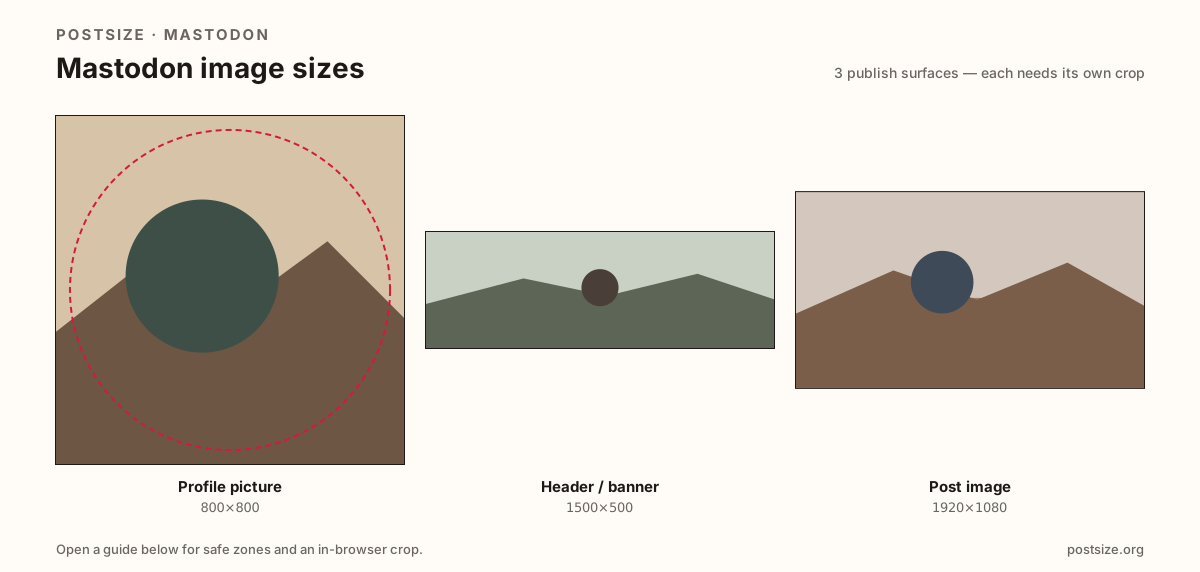
Sizes on Mastodon
Open a guide for exact pixels, safe zones, and an in-browser crop for that surface.
Fediverse identity vs timeline media
Your avatar is a circle or rounded square—prefer an 800×800 upload; Mastodon docs downscale avatars to 400×400. The header targets 1500×500 (3:1) with avatar overlap. Post attachments are flexible—1920×1080 is a practical landscape default, not a universal mandate.
Instance differences are real. Upload caps often sit near ~2MB by default, but your home server can raise or lower them. Always preview on the instance you actually use.
Each guide includes practical pixels, a checklist, and an in-browser crop. Nothing is uploaded to a server—you download the file and publish on your Mastodon instance yourself.
Quick picks
Match the task to the guide so you do not export the wrong ratio.
- Only the circle in the timeline → Profile picture at 800×800.
- Refreshing the profile strip → Header at 1500×500; leave the avatar pocket quiet.
- Attaching media to a status → Post image at 1920×1080 (or another intentional ratio).
- Upload rejected → Check your instance media limit (~2MB is a common default).
Frequently asked questions
What size is a Mastodon profile picture?
Prefer 800×800. Mastodon docs describe downscaling avatars to 400×400. It displays as a circle or rounded square—keep the face centered.
What is the Mastodon header size?
1500×500 (3:1) matches the docs downscale target. Keep logos clear of the avatar overlap and soft on the side edges.
What size should Mastodon posts be?
There is no single mandatory size. 1920×1080 (16:9) is a strong practical landscape default. Confirm your instance media rules if uploads fail.
Are all Mastodon instances the same?
No. Themes, upload caps, and processing can differ. Treat common defaults as starting points and verify on your home server.
Can I crop Mastodon sizes in the browser?
Yes. Every guide on this hub includes an in-browser crop—files stay on your device until you download and upload to your instance yourself.