
Behance · Image sizes
Pick the Behance surface you are publishing to
Project covers sell the case study in the grid; avatars are portfolio bylines. Practical sizes—preview on Behance.
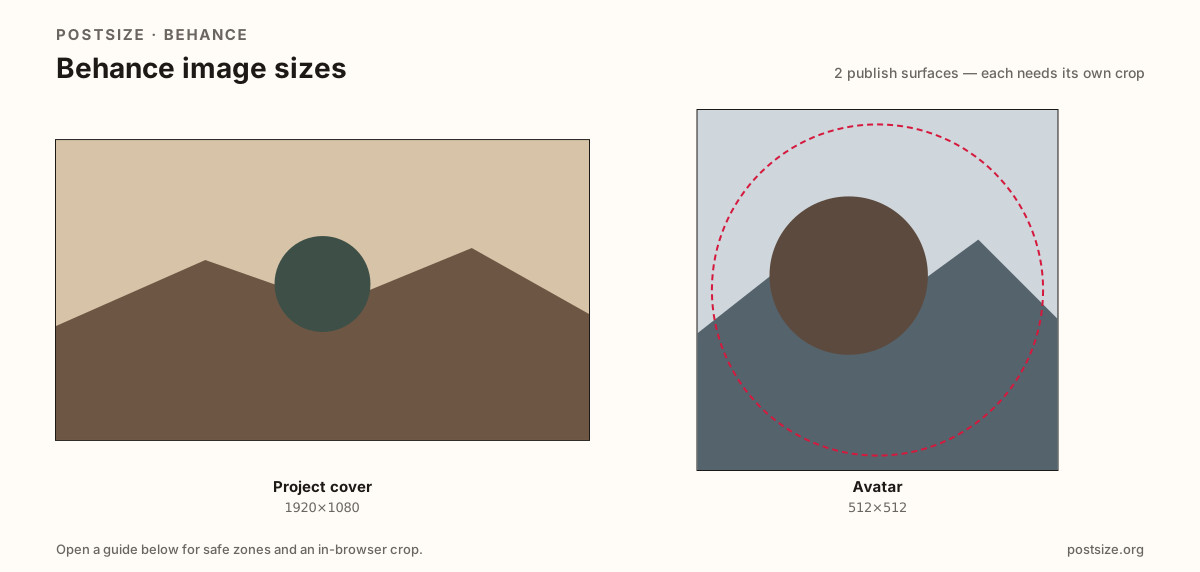
Sizes on Behance
Open a guide for exact pixels, safe zones, and an in-browser crop for that surface.
Portfolio billboards vs profile marks
Project covers lean on a practical 1920×1080 (16:9) stamp—optional 1400×1050 (~4:3) when the work needs more vertical room. Hire managers skim covers as tiny grid tiles.
Avatars want 512×512 for a clear face or studio mark beside projects. Do not stretch a cover into the avatar slot.
Sizes are practical community targets, not a fake official mandate. Re-crop Instagram or LinkedIn starters, then preview live.
Quick picks
Match the task to the guide so you do not export the wrong ratio.
- Case study stamp → Project cover at 1920×1080.
- Taller work on purpose → Optional 1400×1050.
- Only the byline mark → Avatar at 512×512.
- One strongest hero beats a collage cover.
- Sizes are practical—preview on Behance.
Frequently asked questions
What size is a Behance project cover?
A practical export is 1920×1080 (16:9). 1400×1050 (~4:3) is an optional alternate. Preview on Behance.
What size is a Behance avatar?
A practical 512×512 square for the profile mark beside projects.
Should I always use 16:9 covers?
Use 16:9 as the default. Switch to ~4:3 when the project needs more vertical room—and preview either way.
Are these official Behance sizes?
No. Practical community targets as of 2026-08-21. Preview before you publish.
Can I crop Behance sizes in the browser?
Yes. Every guide on this hub includes an in-browser crop—files stay on your device.