
Group icon
Recommended640×640 1:1
Practical square for the circular group mark in chat lists. Not your personal profile picture.
Use in toolWhatsApp · Image size
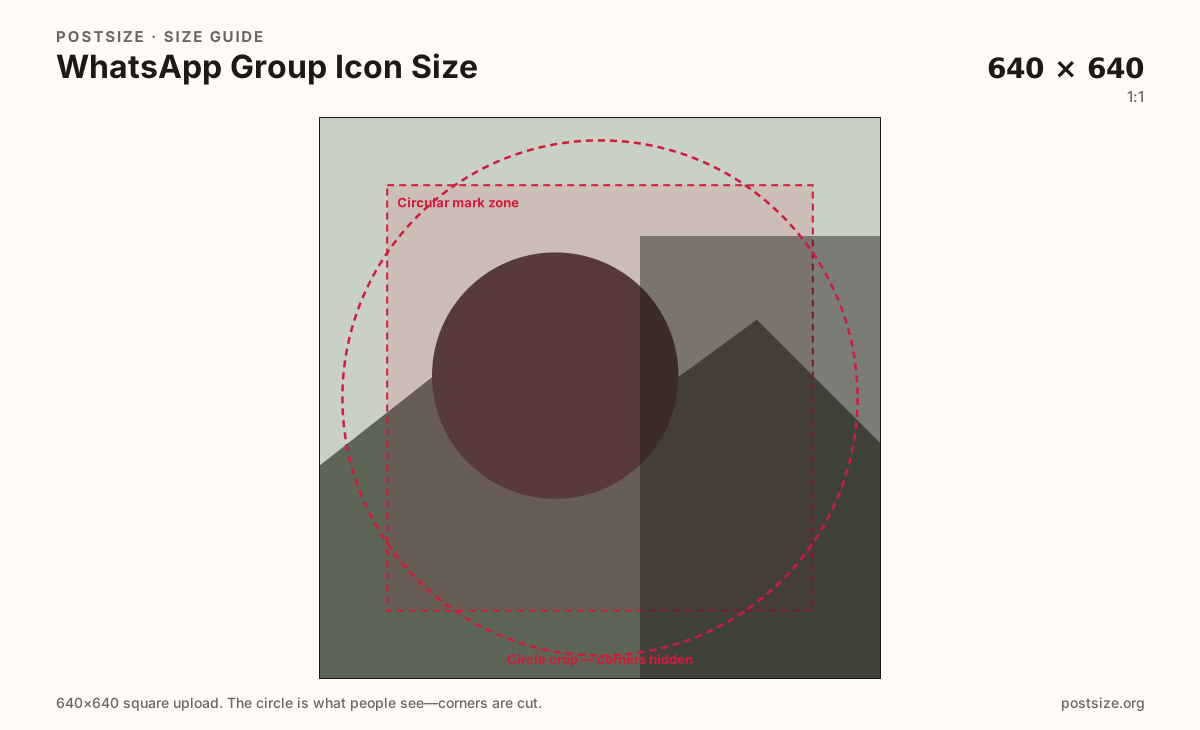
WhatsApp group icons are square uploads shown as circles in chats and the group info screen. Export a clear 640×640 mark, center the logo, then download in your browser.
Browser crop · stays on your device
640 × 640
Add a photo to crop
Upload a logo or group photo—or try the sample—then keep the mark inside the circle before you download.
Always square. WhatsApp masks a circle—keep letters and faces inside the guide. 640×640 matches the practical personal-avatar habit but represents the group, not you.
Export this for WhatsApp upload.
640×640 1:1
Practical square for the circular group mark in chat lists. Not your personal profile picture.
Use in tool| Asset | Pixels | Ratio | Notes | Action |
|---|---|---|---|---|
| Group icon Recommended | 640×640 | 1:1 | Practical square for the circular group mark in chat lists. Not your personal profile picture. | Use in tool |
Every WhatsApp group shows one circular icon in the chat list, notifications, and group info. Members glance at that circle dozens of times a day. A blurry screenshot of a dinner table or a stretched banner crop makes the group harder to find among personal chats.
640×640 is a strong practical square: clear enough after WhatsApp compresses the upload, familiar if you already export personal profile photos at the same pixels. The job is still different. Your personal profile picture follows you across every chat. The group icon represents the shared space—team name, family trip, class project, client channel.
Corners disappear under the circle mask. Long horizontal logos lose letters. Tiny full-scene photos become speckles at chat-list size. Prefer a bold monogram, a short acronym, or one clear face centered in the guide.
Status stills (9:16) and link previews are unrelated surfaces. Do not stretch a Status export into this square. Admins should keep a simple master file so replacements stay consistent when the group theme changes.
Same circle mask—corners disappear; design for the tiny comment-size icon.
Tick these off against your crop preview—nothing is saved.
Similar-looking slots often use different ratios—do not reuse one export for all of them.
640 × 640
This page. Circle in chats and group info.
640 × 640
Your face across chats—different upload.
1080 × 1920
Full-screen vertical—wrong ratio for the icon.
| Surface | Typical size | Note |
|---|---|---|
| Group icon | 640 × 640 | This page. Circle in chats and group info. |
| Personal profile picture | 640 × 640 | Your face across chats—different upload. |
| Status still | 1080 × 1920 | Full-screen vertical—wrong ratio for the icon. |
Both are often 640×640 squares shown as circles—but they answer different questions. Your profile picture answers “who is messaging.” The group icon answers “which chat is this.” Reusing only the admin’s face makes every group look like a DM with that person.
Community, team, and family groups benefit from a dedicated mark: initials, a shared photo with one clear subject, or a simple emoji-style graphic that still reads when compressed.
In the chat list the icon is tiny. Detailed crests and thin outlines vanish. High contrast and one strong shape beat a collage of five faces.
Test the export at roughly the size of a chat-list avatar before you call it done. If you cannot read the letters there, members will not either.
JPG for photographs; PNG for hard-edged logos. Prefer sRGB. 640×640 is the practical default—starting larger and downscaling can help if the source is sharp, but avoid shipping a soft 100×100 upscale.
Upload a logo or photo, choose Group icon (640×640), keep the mark inside the circular guide, then download. Processing stays on your device.
From this download to a live upload in a few minutes.
Download the 640×640 JPG or PNG from the tool.
Open the group → Group info → tap the group photo → upload the new icon (admin permission required).
Check the chat list on your phone—the circle should stay clear at thumbnail size.
If letters clip, simplify the mark and re-export.
Upload a square—640×640 is a strong practical target. WhatsApp displays it as a circle in chats and group info.
No. Your profile picture is personal. The group icon represents the shared chat. Same circle habit, different identity and upload.
Usually group admins. Open Group info and look for the group photo controls—labels vary slightly by app version.
WhatsApp masks a circle. Anything in the square’s corners is removed. Re-crop with the subject inside the circular safe zone.
PNG for logos and hard type; JPG for photos. Prefer sRGB either way.
Not as-is. Status stills are 9:16. Re-crop to a true 640×640 square with the mark inside the circle.