
Workspace icon (recommended)
Recommended512×512 1:1
Practical workspace / team icon. Bold geometry beats thin wordmarks.
Use in toolSlack · Image size
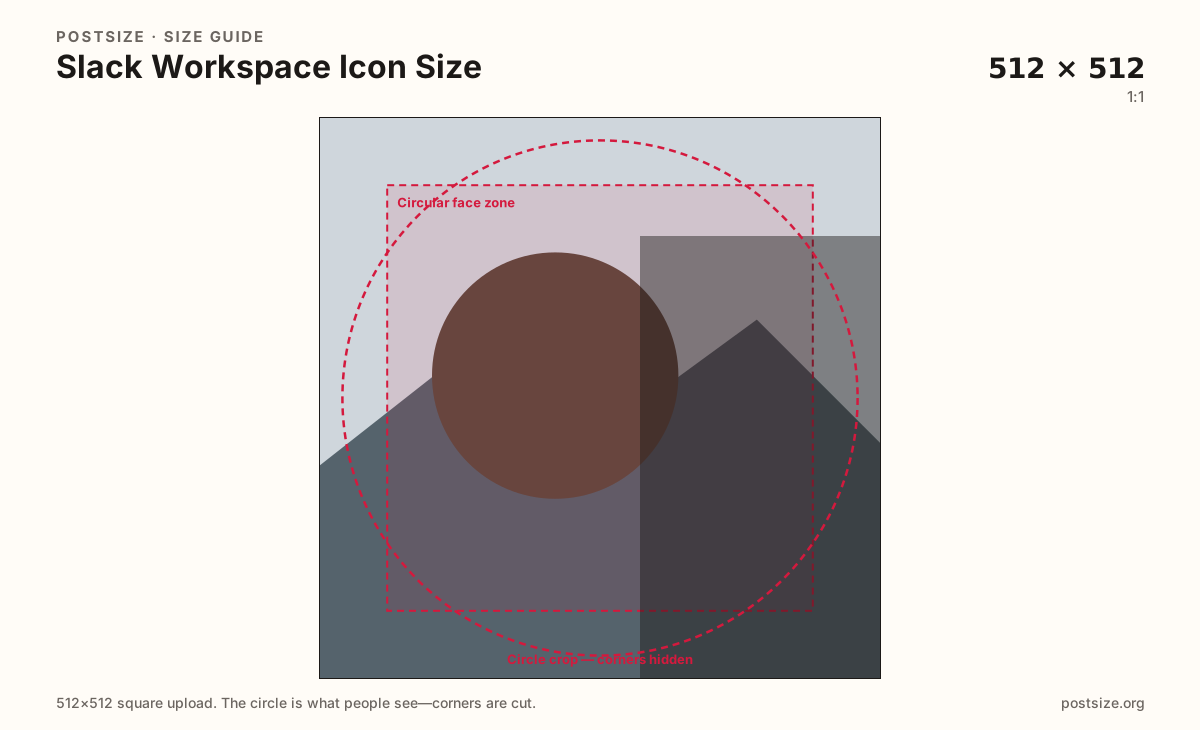
Workspace icons brand the Slack switcher. Export a bold 512×512 mark, keep it circle-safe, then download.
Browser crop · stays on your device
512 × 512
Add a photo to crop
Upload a logo or monogram—or try the sample—then keep the mark inside the circle-safe zone before you download.
This is the team / workspace mark in the switcher—not your personal profile photo and not a custom emoji.
Export this for Slack upload.
512×512 1:1
Practical workspace / team icon. Bold geometry beats thin wordmarks.
Use in tool| Asset | Pixels | Ratio | Notes | Action |
|---|---|---|---|---|
| Workspace icon (recommended) Recommended | 512×512 | 1:1 | Practical workspace / team icon. Bold geometry beats thin wordmarks. | Use in tool |
The workspace icon sits in the Slack switcher, workspace chrome, and invite screens. It is how people spot the right org among a stack of workspaces—not how they recognize you in a thread. Treat it like a product favicon: bold, simple, and circle-safe.
512×512 matches the clarity habit of personal avatars but the job is brand identity. Thin multi-word logos vanish at switcher size. Prefer a monogram, icon, or two-letter lockup with strong contrast on both light and dark Slack themes.
Personal profile photos and custom emoji are different uploads. Stretching a headshot into the workspace slot looks accidental. Shrinking a 512×512 logo into a 128×128 emoji without redesigning the glyph looks muddy in the picker.
Admins usually change this in workspace settings. After upload, check the switcher on desktop and the mobile workspace list—rounded masks can clip corners that looked fine in a square preview.
Same circle mask—corners disappear; design for the tiny comment-size icon.
Tick these off against your crop preview—nothing is saved.
Similar-looking slots often use different ratios—do not reuse one export for all of them.
512 × 512
This page. Team switcher mark.
512 × 512
Personal chat avatar—separate.
128 × 128
Reaction glyph—redesign, do not shrink blindly.
Often 512 × 512
Similar team mark habit.
| Surface | Typical size | Note |
|---|---|---|
| Workspace icon | 512 × 512 | This page. Team switcher mark. |
| Profile picture | 512 × 512 | Personal chat avatar—separate. |
| Custom emoji | 128 × 128 | Reaction glyph—redesign, do not shrink blindly. |
| Discord server icon | Often 512 × 512 | Similar team mark habit. |
People pick workspaces from a vertical stack of small marks. Color and shape matter more than taglines. If two sister brands look identical at that size, adjust color or letterforms.
Pixels can match between icon and avatar; intent does not. Keep people faces on profile photos. Keep brand geometry on the workspace icon. Rebuild emoji as 128×128 glyphs.
PNG suits flat logos; JPG suits photo-based marks. Prefer sRGB. Start from a sharp vector export—do not upscale a soft 64px favicon.
Upload a logo, keep Workspace icon (512×512) selected, drag until the mark sits in the circle zone, then download. Cropping stays in the browser.
From this download to a live upload in a few minutes.
Download the 512×512 JPG or PNG from the tool.
In Slack, open workspace settings → Workspace icon (wording varies by plan) and upload.
Check the desktop switcher and the mobile workspace list.
If corners clip, tighten the mark inside the safe zone and replace.
Export a 512×512 square. Slack shows it as a rounded stamp in the workspace switcher—keep the mark circle-safe.
No. Both may be 512×512, but the icon brands the team and the profile photo identifies you in chat.
Usually workspace owners or admins in workspace settings. Exact permission names vary by plan.
Not well. Emoji want a bold 128×128 glyph—redesign or re-crop instead of blindly shrinking the 512×512 icon.
Yes. This guide includes an in-browser crop—files stay on your device until you download and upload yourself.