
Recommended upload
Recommended1024×1024 1:1
Patreon help recommends a square image at least 1024×1024 for the creator profile photo.
Use in toolPatreon · Image size
Patreon recommends a square profile photo at least 1024×1024. Export a clear circle-safe crop, then download in your browser before you upload.
Browser crop · stays on your device
1024 × 1024
Add a photo to crop
Upload a face or logo photo—or try the sample—then keep the subject inside the circle before you download.
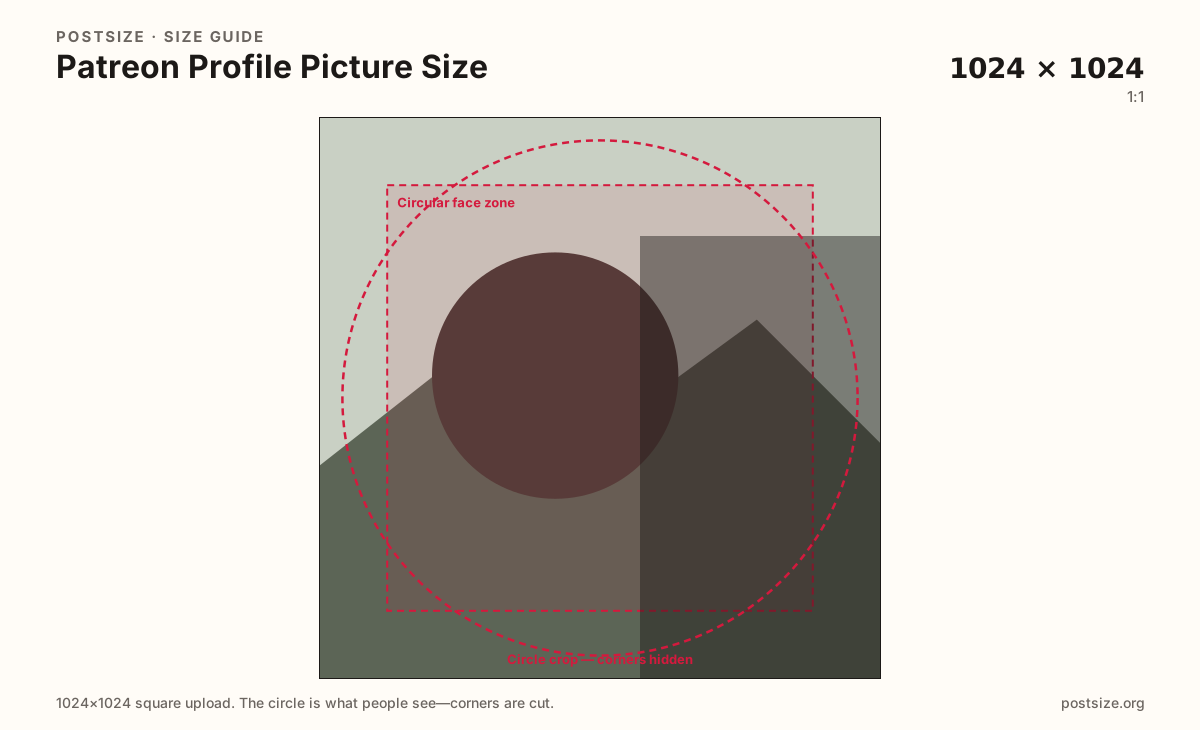
Always square. Patreon shows the photo as a circle on the creator page and in member feeds—keep the face or mark inside the guide.
Export this for Patreon upload.
1024×1024 1:1
Patreon help recommends a square image at least 1024×1024 for the creator profile photo.
Use in tool| Asset | Pixels | Ratio | Notes | Action |
|---|---|---|---|---|
| Recommended upload Recommended | 1024×1024 | 1:1 | Patreon help recommends a square image at least 1024×1024 for the creator profile photo. | Use in tool |
You upload a square, but Patreon almost never shows the full square. The creator page, posts, and membership UI draw a circle. Anything in the four corners disappears the moment the mask applies.
Patreon help recommends at least 1024×1024. That is a clarity floor for modern screens, not a reason to ship a soft 200×200 upscale. Soft files look muddy next to a crisp 1600×400 cover and 16:9 post images.
Profile photo, cover (hero), and post feed images are three different uploads. Do not stretch a 4:1 cover into this square, and do not treat a 1920×1080 post still as an avatar.
Member feeds and comments show a tiny disc. Fill most of the circle with a face or bold mark. Thin wordmarks and group shots fail when the circle shrinks beside a post title.
Same circle mask—corners disappear; design for the tiny comment-size icon.
Tick these off against your crop preview—nothing is saved.
Similar-looking slots often use different ratios—do not reuse one export for all of them.
1024 × 1024
This page. Circle on the creator page and in feeds.
1600 × 400
Wide 4:1 page header—separate export.
1920 × 1080
16:9 feed still—not an avatar substitute.
| Surface | Typical size | Note |
|---|---|---|
| Profile picture | 1024 × 1024 | This page. Circle on the creator page and in feeds. |
| Cover / hero | 1600 × 400 | Wide 4:1 page header—separate export. |
| Post image | 1920 × 1080 | 16:9 feed still—not an avatar substitute. |
Corners of a square never appear once Patreon applies the circle. Keep eyes or the logo center inside the guide. Leave rim detail out—busy edges look chopped on the live page.
The cover is a short 4:1 billboard (1600×400). Forcing that strip into a square warps faces and hides type. Reuse photography if you want—re-crop for the circle.
JPG suits photographs. PNG suits flat marks. Prefer sRGB. Patreon may recompress after upload—bold geometry survives better than film grain.
Upload a photo, choose Recommended upload (1024×1024), drag until the face clears the circle guide, then download. Processing stays in your browser.
From this download to a live upload in a few minutes.
Download the 1024×1024 JPG (photos) or PNG (flat logos) from the tool.
On Patreon, open Edit page / Basics and update the profile photo.
Save, then check the creator page and a recent post on phone and desktop.
If the face sits off-center in the circle, re-crop here and upload again.
Patreon recommends a square image at least 1024×1024. It displays as a circle—keep the face centered.
No. The cover is a wide 1600×400 (4:1) hero. The profile picture is a square circle crop. Export them separately.
JPG for photographs, PNG for flat logos. Export sRGB either way.
Usually a small source was upscaled, or the face sat in a corner the circle clipped. Re-export a true 1024×1024 with the subject centered.
Yes. This guide includes an in-browser crop—files stay on your device until you download and upload to Patreon yourself.