
Shop icon (recommended)
Recommended500×500 1:1
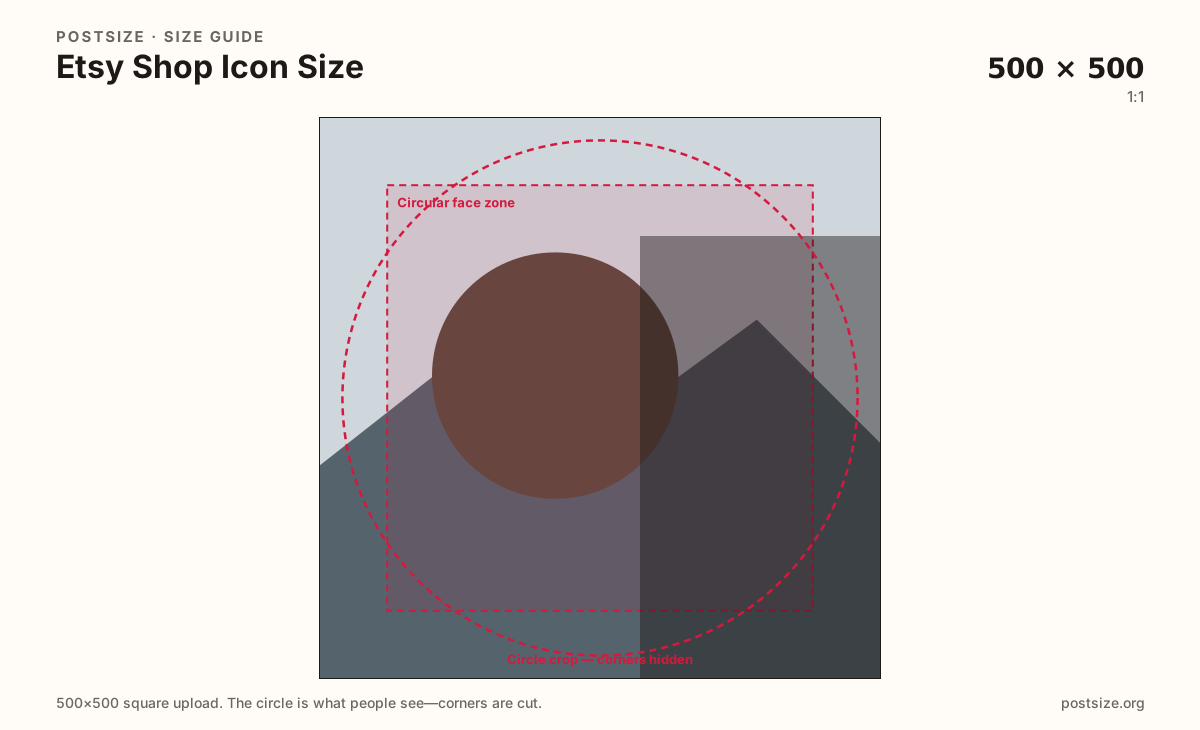
Practical Etsy shop icon upload. Keep the mark inside the circle—corners get clipped.
Use in toolEtsy · Image size
Etsy shop icons upload as a 500×500 square and often display as a circle or rounded tile. Export a clear center-safe mark, then download in your browser.
Browser crop · stays on your device
500 × 500
Add a photo to crop
Upload a logo or mark—or try the sample—then keep the subject inside the circle before you download.
Always square. Etsy shows the shop icon small in search, favorites, and shop chrome—bold geometry beats thin wordmarks.
Export this for Etsy upload.
500×500 1:1
Practical Etsy shop icon upload. Keep the mark inside the circle—corners get clipped.
Use in tool| Asset | Pixels | Ratio | Notes | Action |
|---|---|---|---|---|
| Shop icon (recommended) Recommended | 500×500 | 1:1 | Practical Etsy shop icon upload. Keep the mark inside the circle—corners get clipped. | Use in tool |
You upload a square, but Etsy often shows the shop icon as a circle or rounded tile in search results, favorites, and shop chrome. Anything in the four corners disappears once the mask applies.
500×500 is the practical recommended upload. That is enough clarity for modern screens without pretending the icon is a 2000×2000 listing photo. Soft 100×100 upscales look muddy next to crisp product shots.
Shop icon, shop banner, and listing photos are three different jobs. Do not stretch a 3360×840 banner into this square, and do not treat a product hero as your brand mark.
At favorite-list size the icon is a small disc. Fill most of the circle with a bold monogram or simple mark. Thin multi-word logos fail when the circle shrinks beside a shop name.
Same circle mask—corners disappear; design for the tiny comment-size icon.
Tick these off against your crop preview—nothing is saved.
Similar-looking slots often use different ratios—do not reuse one export for all of them.
500 × 500
This page. Circle / rounded mark in search and shop UI.
3360 × 840
Wide homepage header—separate export.
2000 × 2000
Product still—not an icon substitute.
| Surface | Typical size | Note |
|---|---|---|
| Shop icon | 500 × 500 | This page. Circle / rounded mark in search and shop UI. |
| Shop banner | 3360 × 840 | Wide homepage header—separate export. |
| Listing photo | 2000 × 2000 | Product still—not an icon substitute. |
Corners of a square never appear once Etsy applies a circle or heavy rounding. Keep the monogram or symbol inside the guide. Leave rim detail out—busy edges look chopped in search.
The banner is a short 4:1 billboard (3360×840). Forcing that strip into a square warps logos and hides type. Reuse color and photography if you want—re-crop for the circle.
PNG suits flat marks and logos. JPG suits photographic icons. Prefer sRGB. Bold geometry survives Etsy recompression better than fine hairlines.
Upload a logo, choose Shop icon (500×500), drag until the mark clears the circle guide, then download. Processing stays in your browser.
From this download to a live upload in a few minutes.
Download the 500×500 JPG (photos) or PNG (flat logos) from the tool.
In Etsy Seller Hub, open Shop Manager → Info & appearance and update the shop icon.
Save, then check search and favorites views on phone and desktop.
If the mark sits off-center in the circle, re-crop here and upload again.
Upload a 500×500 square. It often displays as a circle or rounded tile—keep the mark centered.
No. The banner is a wide 3360×840 header. The shop icon is a square circle-safe mark. Export them separately.
PNG for flat logos, JPG for photographic marks. Export sRGB either way.
Usually a small source was upscaled, or the mark sat in a corner the circle clipped. Re-export a true 500×500 with the subject centered.
Yes. This guide includes an in-browser crop—files stay on your device until you download and upload to Etsy yourself.