
Practical square
Recommended800×800 1:1
Practical clear square for international creators on RED / Xiaohongshu. Display is circular or rounded—keep the face inside the guide.
Use in toolXiaohongshu (RED) · Image size
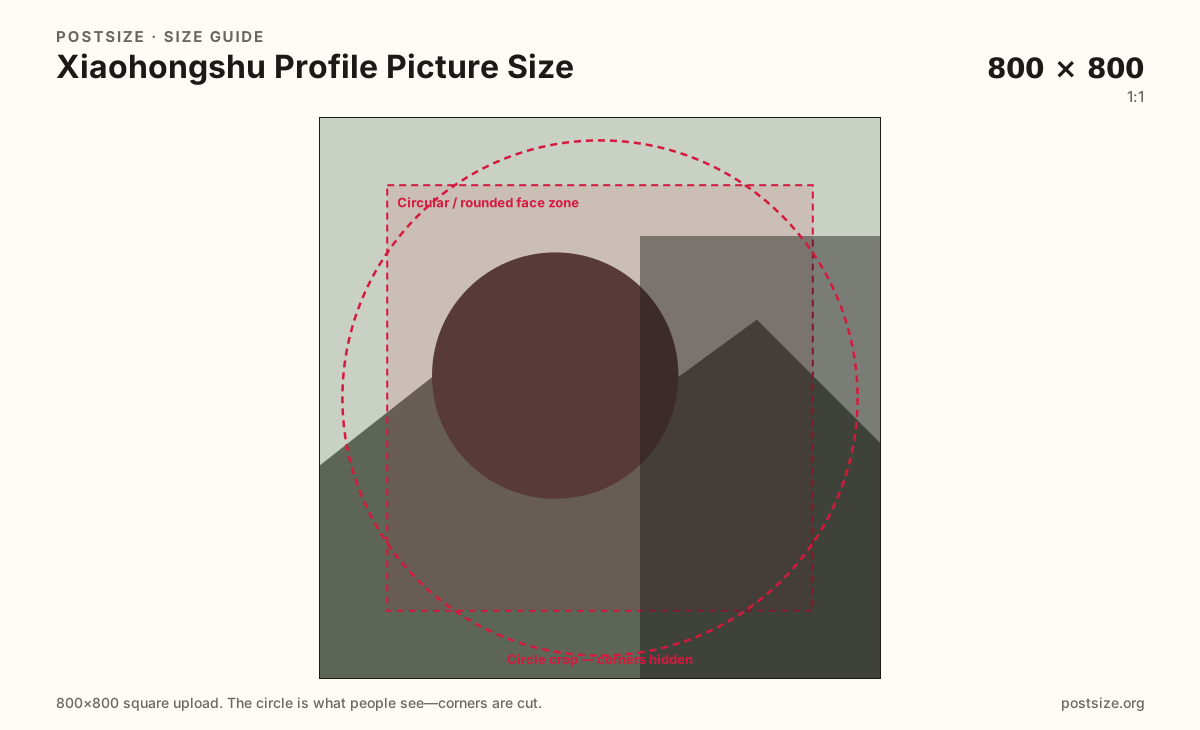
Xiaohongshu (RED) shows your photo as a circle or rounded tile. Export a clear 800×800 square, keep the face inside the guide, then download in your browser.
Browser crop · stays on your device
800 × 800
Add a photo to crop
Upload a headshot or logo—or try the sample—then keep the subject inside the circle guide before you download.
Always start from a square. Comments and lists show a tiny circle or rounded tile—eyes and marks must live inside the guide.
Export this for Xiaohongshu (RED) upload.
800×800 1:1
Practical clear square for international creators on RED / Xiaohongshu. Display is circular or rounded—keep the face inside the guide.
Use in tool| Asset | Pixels | Ratio | Notes | Action |
|---|---|---|---|---|
| Practical square Recommended | 800×800 | 1:1 | Practical clear square for international creators on RED / Xiaohongshu. Display is circular or rounded—keep the face inside the guide. | Use in tool |
International creators often land on Xiaohongshu (RED / RedNote) with an Instagram or TikTok face already saved. That file may be fine as a starting photo, but corners that survive on one app still disappear under RED’s circle or rounded mask. Re-crop here so eyes sit in the guide.
800×800 is a practical clear square for modern phones. Soft 150×150 screenshots will not sharpen because you renamed them “HD.” Start larger when the photo allows it, then keep the face or brand mark bold inside the safe zone.
Comments, follows, and profile headers shrink the same file to a tiny disc. Group selfies and wide wordmarks fail first. Fill most of the circle with one recognizable face or simple mark.
Note covers are a different job at 3:4. Do not stretch a waterfall cover into this square, and do not invent a fake wide profile banner as a substitute for a clear avatar.
Same circle mask—corners disappear; design for the tiny comment-size icon.
Tick these off against your crop preview—nothing is saved.
Similar-looking slots often use different ratios—do not reuse one export for all of them.
800 × 800
This page. Circle or rounded tile on profile and in lists.
1080 × 1440 (try)
3:4 waterfall card—separate export.
1000 × 800 (try)
Homepage backdrop—not a wide X-style banner.
1080 × 1920 (try)
9:16 livestream poster—separate export.
| Surface | Typical size | Note |
|---|---|---|
| Profile picture | 800 × 800 | This page. Circle or rounded tile on profile and in lists. |
| Note cover | 1080 × 1440 (try) | 3:4 waterfall card—separate export. |
| Profile background | 1000 × 800 (try) | Homepage backdrop—not a wide X-style banner. |
| Live cover | 1080 × 1920 (try) | 9:16 livestream poster—separate export. |
Viewers see a circle or rounded square in almost every surface that shows your photo. Place the face in the center and leave a little padding so the mask does not clip ears, hair, or wordmark edges.
Coming from Instagram, Threads, or TikTok? Reuse the photography if you want—do not assume the old export is circle-safe on RED. Open this tool, choose Practical square (800×800), and nudge the face before you upload.
Prefer JPG for headshots. PNG suits flat logos. Keep sRGB and avoid huge files that add nothing once the circle is tiny in comments.
Upload a face or logo photo, choose Practical square (800×800), center the subject in the circle guide, then download. Processing stays on your device.
From this download to a live upload in a few minutes.
Download the 800×800 JPG (or PNG for a flat logo) from the tool.
In Xiaohongshu / RED, open profile edit and update the avatar.
Confirm the circle framing in the app preview.
Check once in a comment or follow list, where the avatar is very small.
Use a square—800×800 is a practical clear upload. Xiaohongshu (RED) shows it as a circle or rounded tile; keep the face centered.
Reuse the photo, then re-crop. Circle masks and display chrome still differ—center the face in this tool before you upload.
No. Note covers are tall 3:4 feed cards. The profile picture is a square circle crop. Export them separately.
Not like X or LinkedIn. RED uses a shorter homepage background (~1000×800)—see the profile background guide—not a 3:1 banner. Use this page only for the circle avatar.
Yes. This guide includes an in-browser crop—files stay on your device until you download and upload to Xiaohongshu yourself.