
Moments cover (practical 9:16)
Recommended1080×1920 9:16
Practical tall Moments cover. UI crops and chrome vary by device—preview on your phone after upload.
Use in toolWeChat · Image size
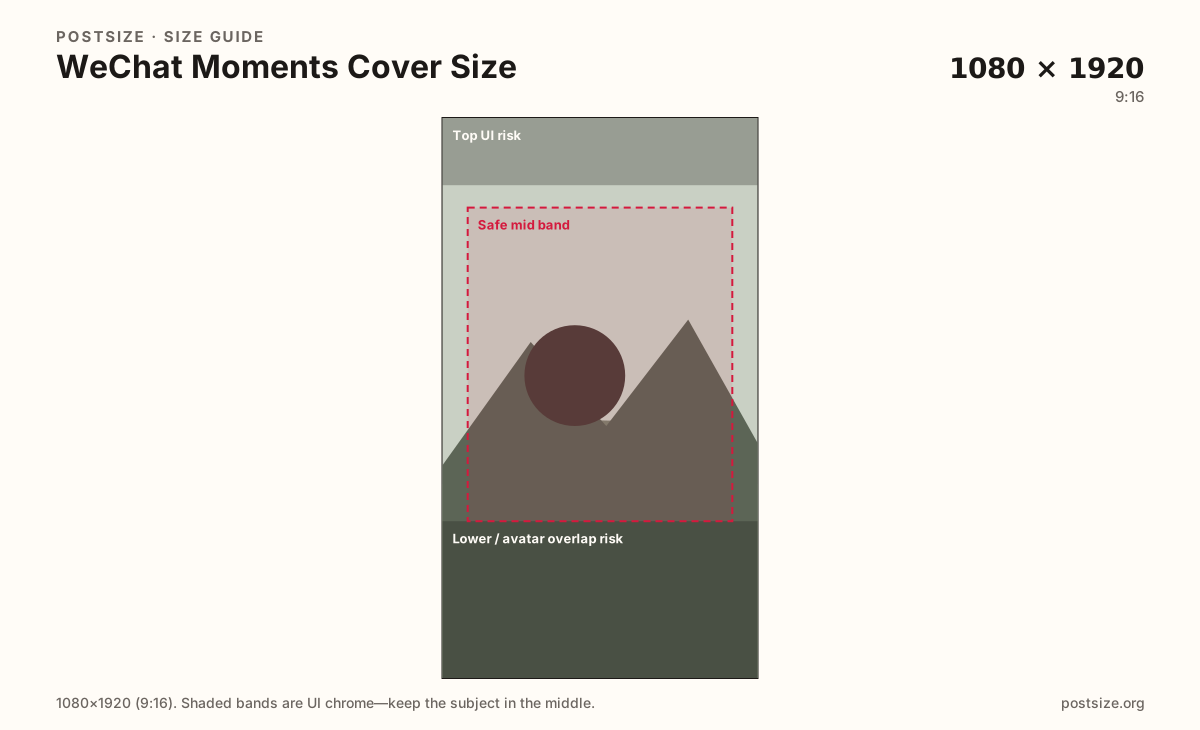
WeChat Moments covers are tall personal banners. Export a practical 1080×1920, keep the hero out of chrome bands, then download—this is not an Official Account header.
Browser crop · stays on your device
1080 × 1920
Add a photo to crop
Upload a portrait photo or graphic—or try the sample—then keep the hero inside the mid band before you download.
Moments is personal social inside WeChat. Official Account headers and chat avatars are different uploads.
Export this for WeChat upload.
1080×1920 9:16
Practical tall Moments cover. UI crops and chrome vary by device—preview on your phone after upload.
Use in tool| Asset | Pixels | Ratio | Notes | Action |
|---|---|---|---|---|
| Moments cover (practical 9:16) Recommended | 1080×1920 | 9:16 | Practical tall Moments cover. UI crops and chrome vary by device—preview on your phone after upload. | Use in tool |
WeChat Moments (朋友圈) is the private-ish social layer inside WeChat: friends scroll your updates under a tall cover photo. A practical 1080×1920 (9:16) master gives enough height for phone UIs that overlay names, buttons, and avatar chrome.
Unlike Instagram Stories, this cover stays on your Moments homepage as identity art. Hooks belong in the mid band—top and lower regions often collide with status UI or the circular avatar overlap.
Official Account headers (practical ~900×500) are brand cards for public accounts—not Moments. Chat profile pictures are 640×640 circles. Stretching either into Moments wastes the tall canvas.
LINE VOOM and Instagram Stories can supply starter photos, but Moments is culturally closer to a personal album front than a public brand billboard. Keep the mood personal; save campaign banners for the OA header guide.
Same full-screen frame—top and bottom UI chrome cover anything glued to the edges.
Tick these off against your crop preview—nothing is saved.
Similar-looking slots often use different ratios—do not reuse one export for all of them.
1080 × 1920
This page. Tall personal Moments banner.
640 × 640
Chat circle—separate guide.
900 × 500
Official Account card—not Moments.
Square or 9:16
Starter files only—re-crop for Moments chrome.
| Surface | Typical size | Note |
|---|---|---|
| Moments cover | 1080 × 1920 | This page. Tall personal Moments banner. |
| Profile picture | 640 × 640 | Chat circle—separate guide. |
| OA header | 900 × 500 | Official Account card—not Moments. |
| LINE VOOM / Stories | Square or 9:16 | Starter files only—re-crop for Moments chrome. |
Moments is mainly for friends and weak-tie acquaintances inside WeChat. Covers that feel like hard-sell banners can look out of place next to personal albums. Prefer atmosphere, travel, or a clean portrait over dense promo grids.
Moments is personal; Official Accounts are public brand channels. LINE has VOOM squares and OA covers instead of Moments. Cross-messenger brands should keep separate exports.
JPG for photos; PNG for flat graphics. Prefer sRGB. Start from a sharp portrait master—do not upscale a soft screenshot.
Upload a portrait, choose Moments cover (1080×1920), keep the hero in the mid band, then download.
From this download to a live upload in a few minutes.
Download the 1080×1920 JPG or PNG from the tool.
In WeChat, open Moments → your cover / change cover and upload.
Open Moments on your phone and check chrome overlap.
If something clips, raise or lower the hero and re-export.
A practical export is 1080×1920 (9:16). Device chrome varies—preview on your phone after upload.
No. Moments is personal social. Official Accounts use a separate header (practical 900×500) for public brand pages.
Often as a starter 9:16 file. Still re-check WeChat’s avatar overlap and Moments chrome.
No. Practical community sizing as of 2026-08-21. Always preview before you publish.
Yes. Files stay on your device until you download and upload to WeChat yourself.