
Story (recommended)
Recommended1080×1920 9:16
Full-screen 9:16 Story still. Same pixel habit as many Stories apps—Telegram chrome and reply UI still differ.
Use in toolTelegram · Image size
Telegram Stories use a full-phone 9:16 frame. Export 1080×1920, keep faces out of chrome bands, then download—this is not a channel post card.
Browser crop · stays on your device
1080 × 1920
Add a photo to crop
Upload a vertical graphic—or try the sample—then keep the hook inside the mid band before you download.
This is a Story frame—not a 1280×720 channel post and not the circular profile photo. Telegram has no X-style profile banner here.
Export this for Telegram upload.
1080×1920 9:16
Full-screen 9:16 Story still. Same pixel habit as many Stories apps—Telegram chrome and reply UI still differ.
Use in tool| Asset | Pixels | Ratio | Notes | Action |
|---|---|---|---|---|
| Story (recommended) Recommended | 1080×1920 | 9:16 | Full-screen 9:16 Story still. Same pixel habit as many Stories apps—Telegram chrome and reply UI still differ. | Use in tool |
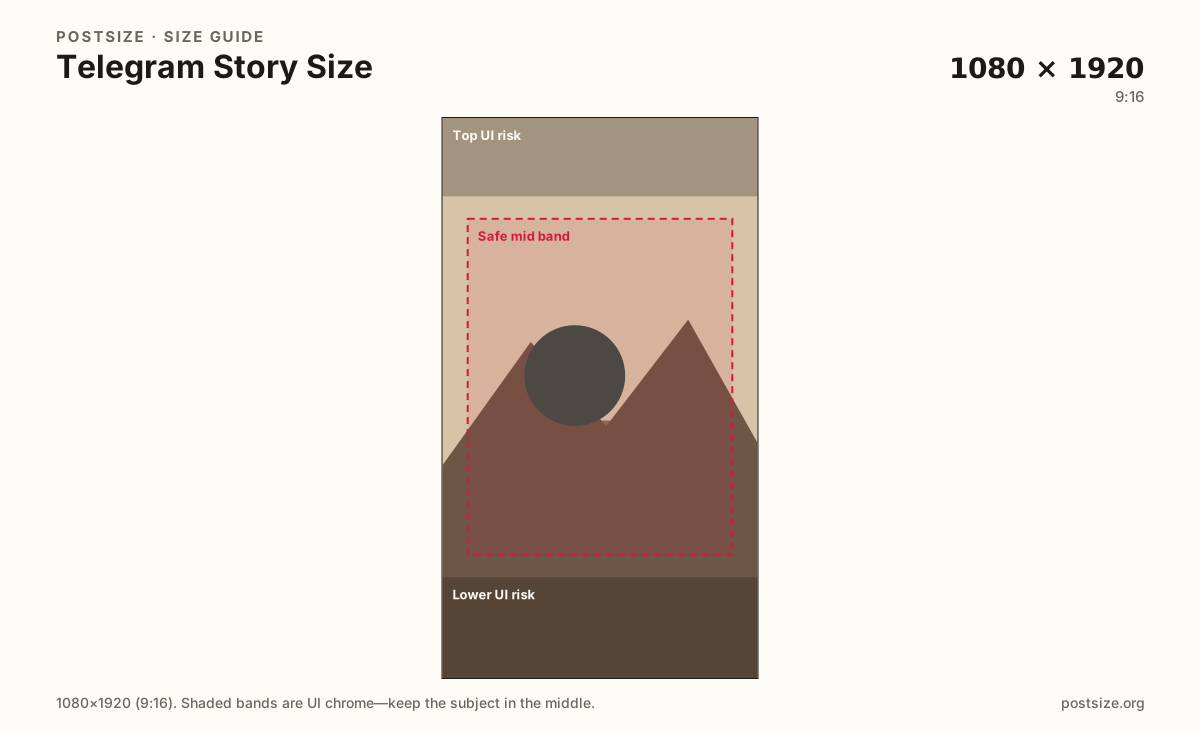
Telegram Stories fill the phone under progress ticks, reply controls, and privacy chrome. Hooks need to sit in the clear mid band—faces and titles on the extreme top or bottom often collide with UI.
Channel posts are a different job: practical 1280×720 widescreen (or square) cards in the feed. Stretching a Story into a channel post letterboxes the art; stretching a channel still into a Story wastes the vertical canvas.
Profile photos remain circular squares (try 1024×1024). Creators searching for a “Telegram banner” usually want a channel post or a Story—personal profiles here do not use an X-style wide header.
Instagram and WhatsApp Stories share the same 1080×1920 habit as a starting file. Still re-check Telegram’s reply and progress chrome before you publish a campaign frame.
Same full-screen frame—top and bottom UI chrome cover anything glued to the edges.
Tick these off against your crop preview—nothing is saved.
Similar-looking slots often use different ratios—do not reuse one export for all of them.
1080 × 1920
This page. Full-screen 9:16 Story still.
1280 × 720
Feed still—separate guide.
1024 × 1024
Circular chat photo—third file.
1080 × 1920
Common starter—re-check Telegram chrome.
| Surface | Typical size | Note |
|---|---|---|
| Story | 1080 × 1920 | This page. Full-screen 9:16 Story still. |
| Channel post | 1280 × 720 | Feed still—separate guide. |
| Profile picture | 1024 × 1024 | Circular chat photo—third file. |
| Instagram / WhatsApp Story | 1080 × 1920 | Common starter—re-check Telegram chrome. |
Many Stories apps share 1080×1920 pixels. Telegram’s progress bar, privacy controls, and reply affordances still eat different edges. Treat the top and lower risk bands as keep-out for critical faces and titles.
Stories are ephemeral full-screen frames. Channel posts are persistent feed cards. Profile photos are chat circles. Searching for a banner usually means a channel post—not a fake X header.
JPG for photos; PNG for hard graphics. Prefer sRGB. Start from a sharp vertical master—do not upscale a soft screenshot.
Upload a vertical graphic, choose Story (1080×1920), keep the hook in the mid band, then download.
From this download to a live upload in a few minutes.
Download the 1080×1920 JPG or PNG from the tool.
In Telegram, open Stories and publish the still (or set it as a Story frame).
Preview on a phone with progress and reply UI visible.
If something clips, raise or lower the hero and re-export.
1080×1920 pixels (9:16) is the practical full-screen frame. Keep subjects clear of Story chrome.
No. Channel posts often use 1280×720. Stories are vertical full-screen frames.
Not like X or YouTube. Use the circular profile photo, a channel post, or a Story—do not invent a fake header crop.
Often as a starter 9:16 file. Still re-check Telegram’s progress and reply chrome.
Yes. Files stay on your device until you download and upload to Telegram yourself.