
Clearer upload
Recommended1000×1000 1:1
Clearer square for modern screens. SoundCloud still shows a circle—keep the subject inside the guide.
Use in toolSoundCloud · Image size
SoundCloud help asks for a square image at least 800×800. Export a clear 1000×1000 circle-safe crop, keep the face inside the guide, then download in your browser.
Browser crop · stays on your device
1000 × 1000
Add a photo to crop
Upload a headshot or logo—or try the sample—then keep the subject inside the circle before you download.
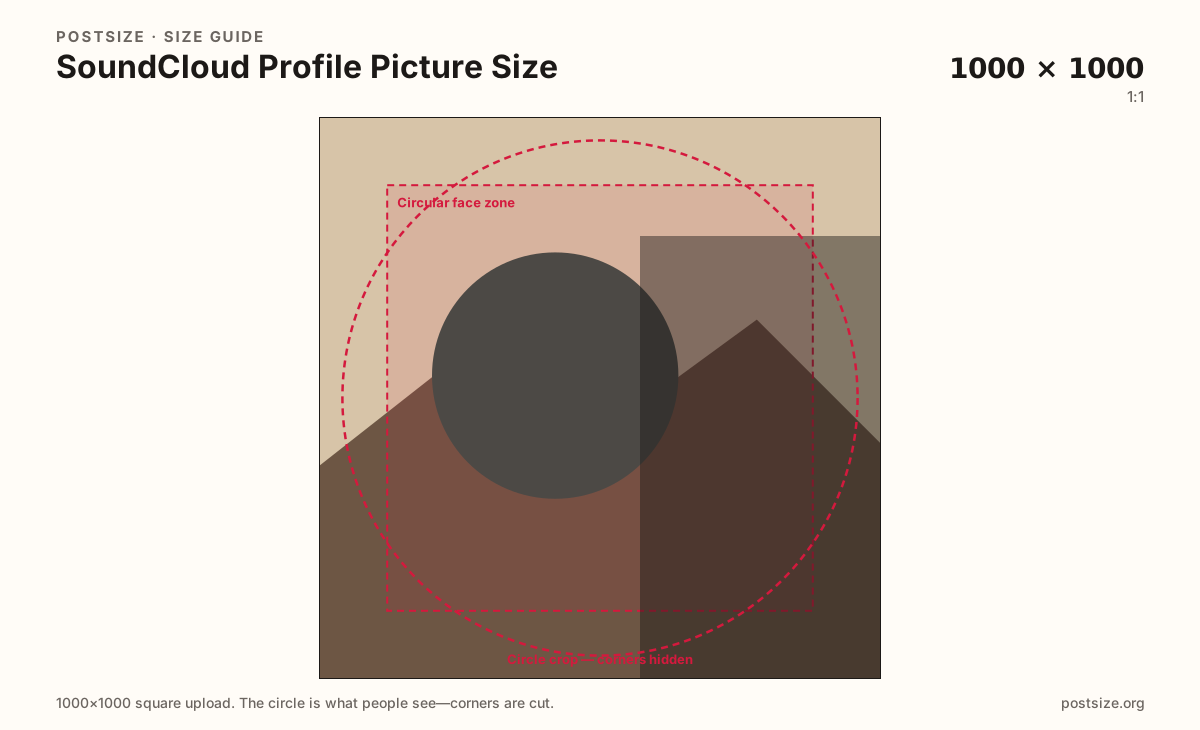
Always square. SoundCloud displays the photo as a circle on the profile and in lists—keep the face or mark inside the guide.
Export this for SoundCloud upload.
1000×1000 1:1
Clearer square for modern screens. SoundCloud still shows a circle—keep the subject inside the guide.
Use in tool800×800 1:1
SoundCloud help says at least 800×800 square. Prefer 1000×1000 when the source allows it.
Use in tool| Asset | Pixels | Ratio | Notes | Action |
|---|---|---|---|---|
| Clearer upload Recommended | 1000×1000 | 1:1 | Clearer square for modern screens. SoundCloud still shows a circle—keep the subject inside the guide. | Use in tool |
| Official minimum useful | 800×800 | 1:1 | SoundCloud help says at least 800×800 square. Prefer 1000×1000 when the source allows it. | Use in tool |
You upload a square, but SoundCloud almost never shows the full square. The artist page, comments, and discovery lists draw a circle. Anything in the four corners disappears the moment the mask applies.
SoundCloud help recommends at least 800×800. That is a clarity floor, not a reason to ship a soft 200×200 upscale. Prefer a clearer 1000×1000 when the photo allows it, then keep the face or mark bold inside the circle.
Help also notes a 2MB limit and that profile image changes are done on the SoundCloud website—not as a casual swap inside every mobile listening surface. Plan to upload from a browser after you export here.
The profile header and the track cover are different jobs. Do not stretch a 2480×520 header into this square, and do not treat an 800×800 track artwork as a finished avatar without a circle-safe re-crop.
Same circle mask—corners disappear; design for the tiny comment-size icon.
Tick these off against your crop preview—nothing is saved.
Similar-looking slots often use different ratios—do not reuse one export for all of them.
1000 × 1000 (try)
This page. Circle on the profile and in lists (min useful 800×800).
2480 × 520
Wide profile header—separate export.
800 × 800
Square artwork for a track—not the circular profile photo.
| Surface | Typical size | Note |
|---|---|---|
| Profile picture | 1000 × 1000 (try) | This page. Circle on the profile and in lists (min useful 800×800). |
| Header / banner | 2480 × 520 | Wide profile header—separate export. |
| Track cover | 800 × 800 | Square artwork for a track—not the circular profile photo. |
Corners of a square never appear once SoundCloud applies the circle. Keep eyes or the logo center inside the guide. Leave rim detail out—busy edges look chopped next to track titles.
SoundCloud help points creators to the website for profile image changes and cites a 2MB limit. Export a clear square here, then upload from a desktop or mobile browser—do not assume every app screen exposes the same editor.
JPG suits photographs. PNG suits flat marks. Prefer sRGB. Stay under 2MB so the website upload accepts the file.
Upload a photo, choose Clearer upload (1000×1000), drag until the face clears the circle guide, then download. Processing stays in your browser.
From this download to a live upload in a few minutes.
Download the 1000×1000 (or 800×800) JPG or PNG from the tool—keep it under 2MB.
On the SoundCloud website, open your profile settings and update the profile image.
Save, then check the profile and a track page on phone and desktop.
If the face sits off-center in the circle, re-crop here and upload again.
SoundCloud help asks for a square at least 800×800. Prefer 1000×1000 when you can. It displays as a circle—keep the face centered.
No. Track covers are square artwork for a release. The profile picture is a circular identity mark. Export them separately even if both are 800×800.
Help cites 2MB for the profile image. Compress carefully if your export is heavier.
Help directs profile image updates to the SoundCloud website. Use a browser after you crop here.
Yes. This guide includes an in-browser crop—files stay on your device until you download and upload to SoundCloud yourself.