
Recommended upload
Recommended512×512 1:1
Clear square for phones. Reddit still masks a circle from the center on most surfaces.
Use in toolReddit · Image size
Reddit shows your profile photo as a circle in comments, chats, and on your profile. Export a clear square, center the face, then download in your browser.
Browser crop · stays on your device
512 × 512
Add a photo to crop
Upload a headshot—or try the sample—then keep the face inside the circle before you download.
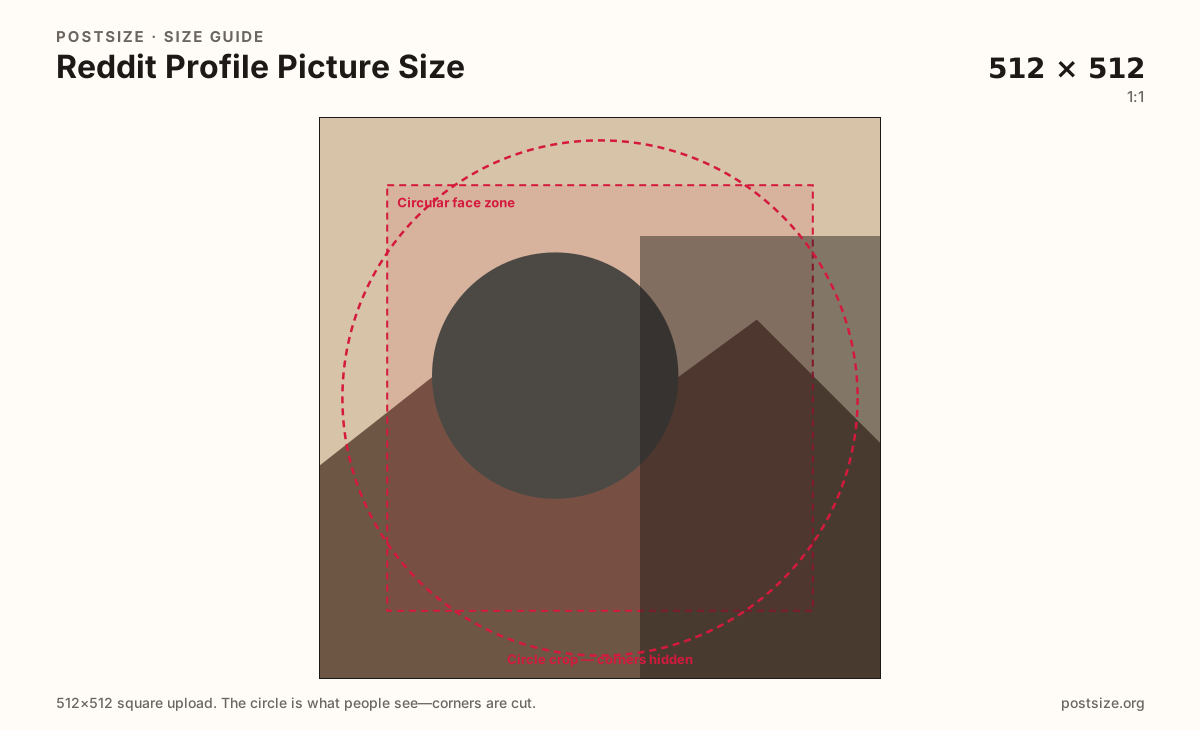
Square upload, circle display. Keep eyes and logos inside the guide—corners disappear under the mask.
Export this for Reddit upload.
512×512 1:1
Clear square for phones. Reddit still masks a circle from the center on most surfaces.
Use in tool| Asset | Pixels | Ratio | Notes | Action |
|---|---|---|---|---|
| Recommended upload Recommended | 512×512 | 1:1 | Clear square for phones. Reddit still masks a circle from the center on most surfaces. | Use in tool |
Reference sizes and crops—not always separate upload files.
256×256 1:1
Typical on-screen avatar size. Prefer the larger upload when the source is detailed.
Use in tool| Asset | Pixels | Ratio | Notes | Action |
|---|---|---|---|---|
| Common display reference | 256×256 | 1:1 | Typical on-screen avatar size. Prefer the larger upload when the source is detailed. | Use in tool |
Your Reddit avatar appears next to every comment and on your profile. At feed size it is often smaller than a coin. Soft phone screenshots, busy group photos, and edge-glued logos fail first.
Upload a clean square—512×512 is a practical clear target—then keep the face or mark centered. Reddit applies a circle, so anything important only in the corners is gone after upload.
The profile banner behind your name is a different file. Quiet banner colors help the circle read; a dark avatar on a dark banner makes the header feel unfinished.
Subreddit community icons look similar as circles but belong to the community settings, not your personal profile. Export those separately when you moderate a sub.
Same circle mask—corners disappear; design for the tiny comment-size icon.
Tick these off against your crop preview—nothing is saved.
Similar-looking slots often use different ratios—do not reuse one export for all of them.
512 × 512 (try)
This page. Circle on profile and in comments.
1920 × 384 typical
Wide header behind the avatar—different guide.
256 × 256
Subreddit mark—separate from your personal avatar.
1200 × 628 or square
Feed and link cards—not an avatar substitute.
| Surface | Typical size | Note |
|---|---|---|
| Profile picture | 512 × 512 (try) | This page. Circle on profile and in comments. |
| Profile banner | 1920 × 384 typical | Wide header behind the avatar—different guide. |
| Community icon | 256 × 256 | Subreddit mark—separate from your personal avatar. |
| Post image | 1200 × 628 or square | Feed and link cards—not an avatar substitute. |
You upload a square; viewers see a circle. Place the face in the center with a little padding so hair and ears are not clipped oddly.
At comment size, bold faces beat fine jewelry detail or busy city backdrops. If you cannot recognize yourself at the size of a coin, tighten the crop.
JPG suits headshots. PNG suits flat logos. Prefer sRGB. A clean 512×512 file usually survives compression better than a noisy oversized dump.
Your profile picture represents you in comments. A community icon represents a subreddit in feeds and search. Same circle habit, different upload slot—export two files if you need both.
Upload a headshot, choose Recommended upload (512×512), center the face in the circle guide, then download. Processing stays on your device.
From this download to a live upload in a few minutes.
Download the square JPG (or PNG for a flat logo) from the tool.
On Reddit, open your profile → edit → avatar / profile picture → upload.
Confirm the circle framing before you save.
Check a comment thread on your phone where the avatar is very small.
If the face looks tiny, re-crop tighter and upload again.
Use a square. About 256×256 is a common display size; uploading 512×512 usually looks clearer. Reddit shows the image as a circle on most surfaces.
Yes. Keep the face centered inside a circular safe zone so the mask does not clip oddly.
No. Community icons belong to a subreddit. Personal avatars belong to your account. Export each for its own settings screen.
JPG for photographs, PNG for flat logos. Prefer sRGB either way.
Coordinate colors if you like, but export the avatar as its own square. The banner still needs a quiet lower band where UI and the avatar sit.
You can, but faces become hard to recognize at comment size. A tighter head-and-shoulders crop usually performs better.
Usually a tiny source was upscaled, or Reddit compressed a noisy file. Start from a clear camera export and keep the subject bold inside the circle.