
Company logo (recommended)
Recommended300×300 1:1
Common minimum / recommended square for the Company Page logo. Displayed as a circle.
Use in toolLinkedIn · Image size
LinkedIn Company Page logos are square marks shown as circles on the Page. Export 300×300, or a clearer 800×800 when the source is sharp, then download in your browser.
Browser crop · stays on your device
300 × 300
Add a photo to crop
Upload a logo mark—or try the sample—then keep letters inside the circle before you download.
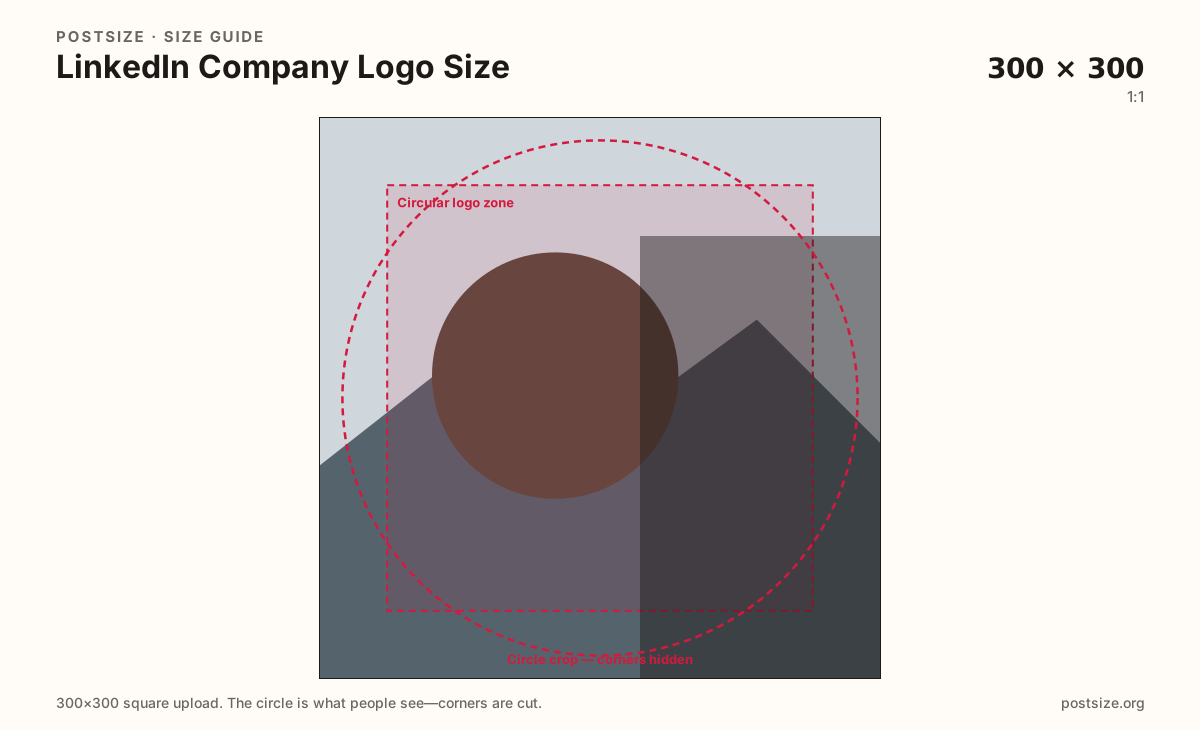
Always square. LinkedIn masks a circle on the Company Page—keep letters inside the guide. 300×300 is the practical default; 800×800 helps when the source supports it.
Export this for LinkedIn upload.
300×300 1:1
Common minimum / recommended square for the Company Page logo. Displayed as a circle.
Use in tool800×800 1:1
Practical sharper upload when the logo master is crisp. Same circle framing.
Use in tool| Asset | Pixels | Ratio | Notes | Action |
|---|---|---|---|---|
| Company logo (recommended) Recommended | 300×300 | 1:1 | Common minimum / recommended square for the Company Page logo. Displayed as a circle. | Use in tool |
| Clearer square | 800×800 | 1:1 | Practical sharper upload when the logo master is crisp. Same circle framing. | Use in tool |
LinkedIn shows the Company Page logo as a circle over or beside the cover strip. You still upload a square. Anything in the four corners disappears under the mask, so long horizontal wordmarks often lose the first and last letters.
300×300 is a widely cited practical size for the Page logo. When your brand master is sharp, an 800×800 export gives LinkedIn more detail to scale down cleanly in feed cards and on retina phones. Soft tiny PNGs do not improve by padding empty pixels.
This is not a personal profile photo. Headshot crops that work for individuals look unprofessional as the only company mark. Prefer a monogram, icon, or short brand lockup designed for a circle—then keep the wide cover as a separate ~5.9:1 file.
Ads, posts, and link previews may reuse the logo at very small sizes. If the mark fails at roughly 40px on your screen, simplify before you publish. Busy crests and thin outlines vanish after compression.
Same circle mask—corners disappear; design for the tiny comment-size icon.
Tick these off against your crop preview—nothing is saved.
Similar-looking slots often use different ratios—do not reuse one export for all of them.
300 × 300
This page default. Circle on the Company Page.
800 × 800
Optional sharper square—same circle habit.
1128 × 191
Wide Page background—separate guide.
400 × 400+
Individual headshot—not the Page logo.
| Surface | Typical size | Note |
|---|---|---|
| Company logo | 300 × 300 | This page default. Circle on the Company Page. |
| Clearer company logo | 800 × 800 | Optional sharper square—same circle habit. |
| Company cover | 1128 × 191 | Wide Page background—separate guide. |
| Personal profile photo | 400 × 400+ | Individual headshot—not the Page logo. |
LinkedIn’s Page chrome almost never shows the full square. Corners vanish. Center the icon, keep padding inside the circular guide, and avoid hairline strokes that disappear after upload.
If your official lockup is a long wordmark, ship a dedicated circular version for LinkedIn instead of forcing the full horizontal logo into 300×300.
The cover is a short wide strip (~1128×191). The logo is a square circle. They share brand color—not a crop. Stretching the cover into the logo slot muddies the mark; stretching the logo across the cover leaves empty sides.
PNG suits logos and hard type; JPG suits simple photo marks. Prefer sRGB. LinkedIn may reject oversized or oddly formatted files—keep weight reasonable.
Upload a logo, choose Company logo (300×300), keep the mark inside the circular guide, then download. Switch to Clearer square (800×800) only when the source is sharp.
From this download to a live upload in a few minutes.
Download the 300×300 PNG (or clearer 800×800) from the tool.
On LinkedIn, open your Company Page as admin → edit logo / Page image.
Upload the square and confirm the circular preview.
Check search results and a phone Page view—the mark should still read.
If letters clip, tighten the crop toward a monogram and re-export.
300×300 pixels square is the practical recommended size. A clearer 800×800 file helps when the master is sharp. LinkedIn displays it as a circle—design inside the circle first.
No. Profile pictures are personal headshots. The Company Page logo is the brand mark on the Page. Same circle thinking, different identity and admin upload.
Start with 300×300. Use 800×800 when your logo file is crisp and you want cleaner scaling on high-resolution screens—same framing either way.
LinkedIn masks a circle. Anything in the square’s corners is removed. Re-crop with the mark inside the circular safe zone.
PNG for logos and hard type; JPG for simple photo marks. Prefer sRGB either way.
As a Page admin, open the Company Page → edit logo / Page image. It is not the personal profile photo field.