
Company cover (recommended upload)
Recommended4200×700 6:1
Hootsuite / Sprout 2026 recommended upload. LinkedIn renders a slim ~1128×191 strip—upload sharp so high-DPI stays crisp.
Use in toolLinkedIn · Image size
Upload LinkedIn Company Page covers at 4200×700. They display as a slim ~1128×191 strip—keep the brand centered, then download in your browser.
Browser crop · stays on your device
4200 × 700
Add a photo to crop
Upload a wide brand graphic—or try the sample—then keep the wordmark in the center band before you download.
Upload 4200×700 (6:1) as the primary master. The live Company Page shows a short strip near 1128×191—design for that height, but do not upload only the display size if you want crisp retina results. Do not stretch a personal 1584×396 cover into this slot.
Export this for LinkedIn upload.
4200×700 6:1
Hootsuite / Sprout 2026 recommended upload. LinkedIn renders a slim ~1128×191 strip—upload sharp so high-DPI stays crisp.
Use in tool| Asset | Pixels | Ratio | Notes | Action |
|---|---|---|---|---|
| Company cover (recommended upload) Recommended | 4200×700 | 6:1 | Hootsuite / Sprout 2026 recommended upload. LinkedIn renders a slim ~1128×191 strip—upload sharp so high-DPI stays crisp. | Use in tool |
Reference sizes and crops—not always separate upload files.
1128×191 ~5.9:1
Approximate on-page display size. Prefer uploading 4200×700; use this only to preview framing at display height.
Use in tool| Asset | Pixels | Ratio | Notes | Action |
|---|---|---|---|---|
| Display-oriented reference | 1128×191 | ~5.9:1 | Approximate on-page display size. Prefer uploading 4200×700; use this only to preview framing at display height. | Use in tool |
LinkedIn Company Page covers are a very wide, short stage. Guides from Hootsuite and Sprout Social in 2026 still list 4200×700 as the recommended upload (about 6:1). After upload, LinkedIn renders a slim strip near 1128×191 on the Page. Shipping only 1128×191 often looks soft on high-DPI and 4K screens.
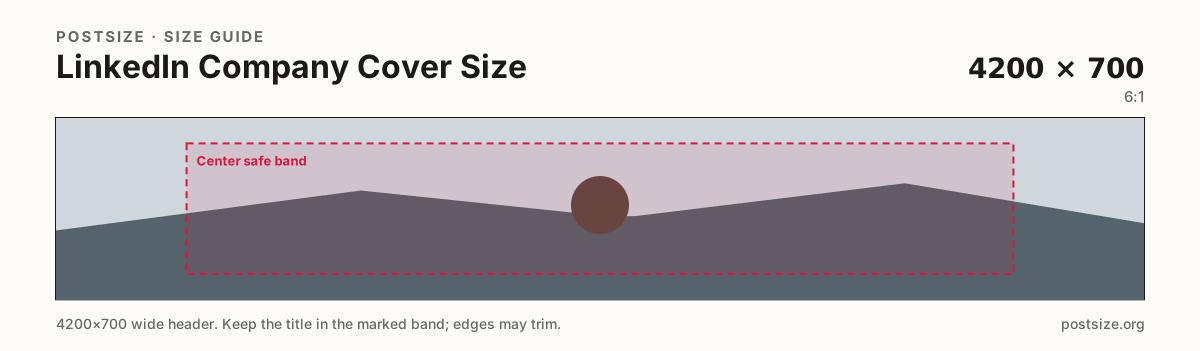
Design for the display height: keep the brand mark and one short line in the open center. Far left and right edges are atmosphere—phones and layout chrome can tighten them. Dense photography, multi-line slogans, and edge-only logos collapse when the strip is under 200px tall.
Personal profile covers stay at 1584×396 (4:1) with a large avatar overlap. Stretching personal banner art into the Company Page slot squeezes faces and clips headlines. Company logos (square circle marks) are a third upload—do not force the circular logo into this strip.
Prefer JPG or PNG, sRGB, and keep file weight under LinkedIn’s common ~3MB cover limit. Soft screenshots, busy stock collages, and microscopic taglines fail after LinkedIn re-encodes the image.
Same short banner strip—quiet lower-left for the avatar, subject in the open mid/right band.
Tick these off against your crop preview—nothing is saved.
Similar-looking slots often use different ratios—do not reuse one export for all of them.
4200 × 700
This page primary. Recommended upload (6:1).
1128 × 191
On-page strip height—framing reference.
1584 × 396
Individual profile banner—different ratio.
300 × 300 (try 800×800)
Square circle mark—separate upload.
| Surface | Typical size | Note |
|---|---|---|
| Company cover upload | 4200 × 700 | This page primary. Recommended upload (6:1). |
| Approx. display | 1128 × 191 | On-page strip height—framing reference. |
| Personal cover | 1584 × 396 | Individual profile banner—different ratio. |
| Company logo | 300 × 300 (try 800×800) | Square circle mark—separate upload. |
Older guides still cite 1128×191 as “the size.” That is closer to how the strip renders on the Page. LinkedIn’s recommended upload—and what Hootsuite / Sprout publish in 2026—is 4200×700 so high-DPI displays stay crisp.
Use the display-oriented preset in this tool to check framing at strip height. Prefer downloading the 4200×700 upload for production.
Personal profiles use a taller 4:1 banner (1584×396) with a large avatar overlap in the lower-left. Company Page covers are a shorter ~6:1 upload that displays as a slim strip. Reusing one file for both usually fails one of the two crops.
Company Page layouts and mobile browsers can trim the far sides of a very wide banner. A wordmark glued only to the left or right rim often disappears for some visitors.
JPG suits photo backgrounds; PNG suits flat brand art. Prefer sRGB. Keep under LinkedIn’s common ~3MB cover limit. Start from a sharp master—LinkedIn compression punishes soft upscales.
Upload a wide graphic, choose Company cover (recommended upload 4200×700), keep the mark inside the center band, then download. Switch to the display reference only to preview strip height.
From this download to a live upload in a few minutes.
Download the 4200×700 JPG or PNG from the tool.
On LinkedIn, open your Company Page → edit cover / background photo (Admin tools).
Upload the file and confirm the strip preview on desktop.
Check the Page on a phone—edges may tighten; the center mark should still read.
If type looks soft, enlarge the line on a sharper master and re-export at 4200×700.
Upload 4200×700 pixels (6:1)—the size Hootsuite and Sprout Social list for Company covers. The Page displays a slim strip near 1128×191.
Upload 4200×700. 1128×191 is closer to display height; uploading only that often looks soft on high-DPI screens.
No. Personal covers are commonly 1584×396 (4:1). Company covers upload at 4200×700 and display as a much shorter strip.
In the center safe band. Far edges can trim on some layouts, so avoid edge-only branding.
Reuse the photo, then re-crop to 4200×700. Facebook covers use a different ratio—force-fitting them warps the brand mark.
As a Page admin, open the Company Page → edit cover / background photo. It is not the same field as a personal profile banner.