
Profile picture (practical)
Recommended800×800 1:1
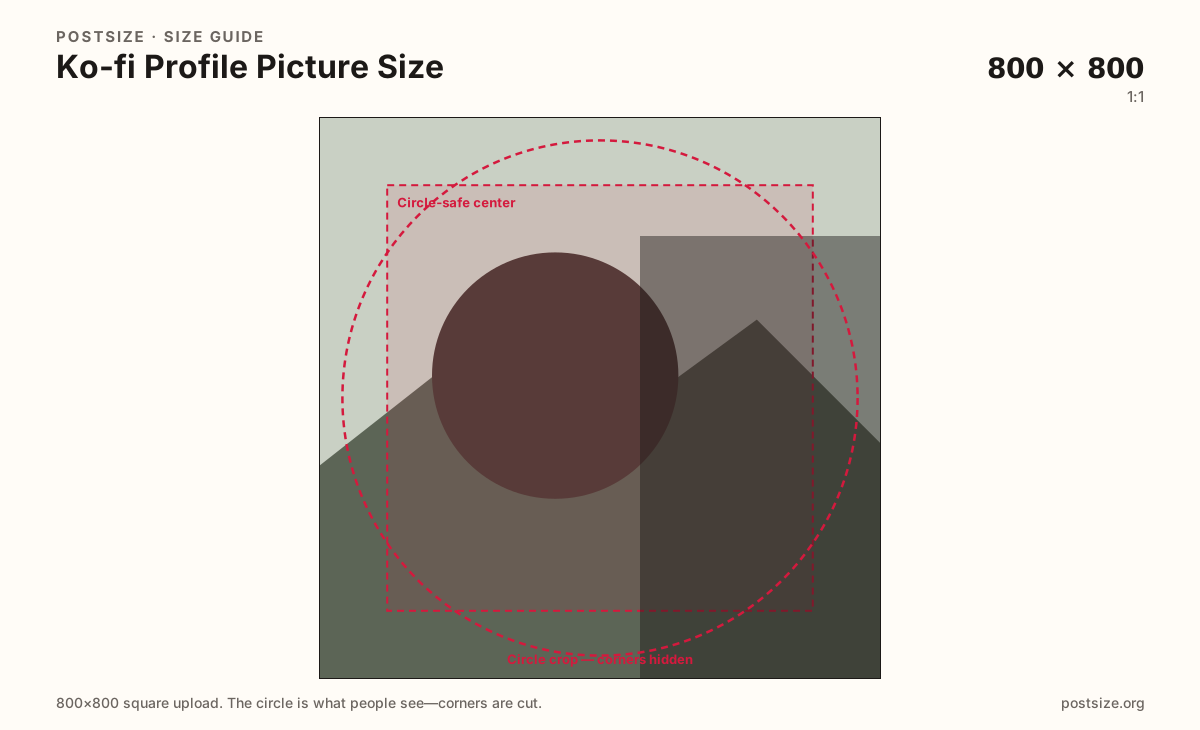
Practical square upload shown as a circle. Keep eyes or the logo in the center.
Use in toolKo-fi · Image size
Ko-fi profile photos become circles on your page. Export 800×800 with the face centered, then download a clear square.
Browser crop · stays on your device
800 × 800
Add a photo to crop
Upload a headshot or logo—or try the sample—then keep the subject inside the circle-safe center before you download.
This is the circular creator avatar—not the 1600×400 page cover strip.
Export this for Ko-fi upload.
800×800 1:1
Practical square upload shown as a circle. Keep eyes or the logo in the center.
Use in tool| Asset | Pixels | Ratio | Notes | Action |
|---|---|---|---|---|
| Profile picture (practical) Recommended | 800×800 | 1:1 | Practical square upload shown as a circle. Keep eyes or the logo in the center. | Use in tool |
On Ko-fi, your profile picture sits as a circle over the cover and beside tips. A practical 800×800 square keeps the face sharp after downscaling. Corners of the square are cropped away—design for the circle.
Wide cover strips are a different upload at 1600×400. Dumping the cover into the avatar slot stretches people and hides slogans. Export a dedicated headshot or monogram.
Patreon, Twitch, and LinkedIn also use circle-safe squares. Reuse the photo if you want—then re-crop so Ko-fi’s circle still frames eyes correctly.
Busy backgrounds and tiny text fail at list size. A clear face or bold mark builds more trust than a full storefront photo squeezed into a disc.
Same circle mask—corners disappear; design for the tiny comment-size icon.
Tick these off against your crop preview—nothing is saved.
Similar-looking slots often use different ratios—do not reuse one export for all of them.
800 × 800
This page. Circular avatar.
1600 × 400
Wide header—separate guide.
Often ~1024 × 1024
Similar circle—re-crop for Ko-fi.
800 × 800
Good starter—still preview on Ko-fi.
| Surface | Typical size | Note |
|---|---|---|
| Profile picture | 800 × 800 | This page. Circular avatar. |
| Page cover | 1600 × 400 | Wide header—separate guide. |
| Patreon profile habit | Often ~1024 × 1024 | Similar circle—re-crop for Ko-fi. |
| LinkedIn profile habit | 800 × 800 | Good starter—still preview on Ko-fi. |
Uploaders ask for a square, but Ko-fi shows a circle. Anything important in the corners disappears. Center the face and leave breathing room around the head.
The cover sells the page mood. The avatar sells who you are. Stretching one file into both slots is the most common Ko-fi branding mistake.
Export 800×800 as JPG or PNG in sRGB. Keep the subject inside the circle-safe center. Soft phone crops look worse after Ko-fi scales the tile down.
Upload a headshot or logo, keep Profile picture (800×800) selected, drag until the subject sits in the circle-safe center, then download. Cropping stays in the browser.
From this download to a live upload in a few minutes.
Download the 800×800 JPG or PNG from the tool.
In Ko-fi settings, update your profile picture.
Open the public page and confirm the circle crop over the cover.
If hair or logo clips, re-center and replace.
A practical upload is 800×800. Ko-fi shows it as a circle—center the face.
No. Covers are 1600×400 strips. Avatars are circle-safe squares.
Yes as a starter—re-crop to 800×800 and preview the circle on your Ko-fi page.
JPG for photos, PNG for flat logos. Prefer sRGB either way.
Yes. In-browser crop—files stay on your device until you download and upload on Ko-fi.