
Profile picture (practical)
Recommended1024×1024 1:1
Practical square avatar for Bandcamp artist / label profiles.
Use in toolBandcamp · Image size
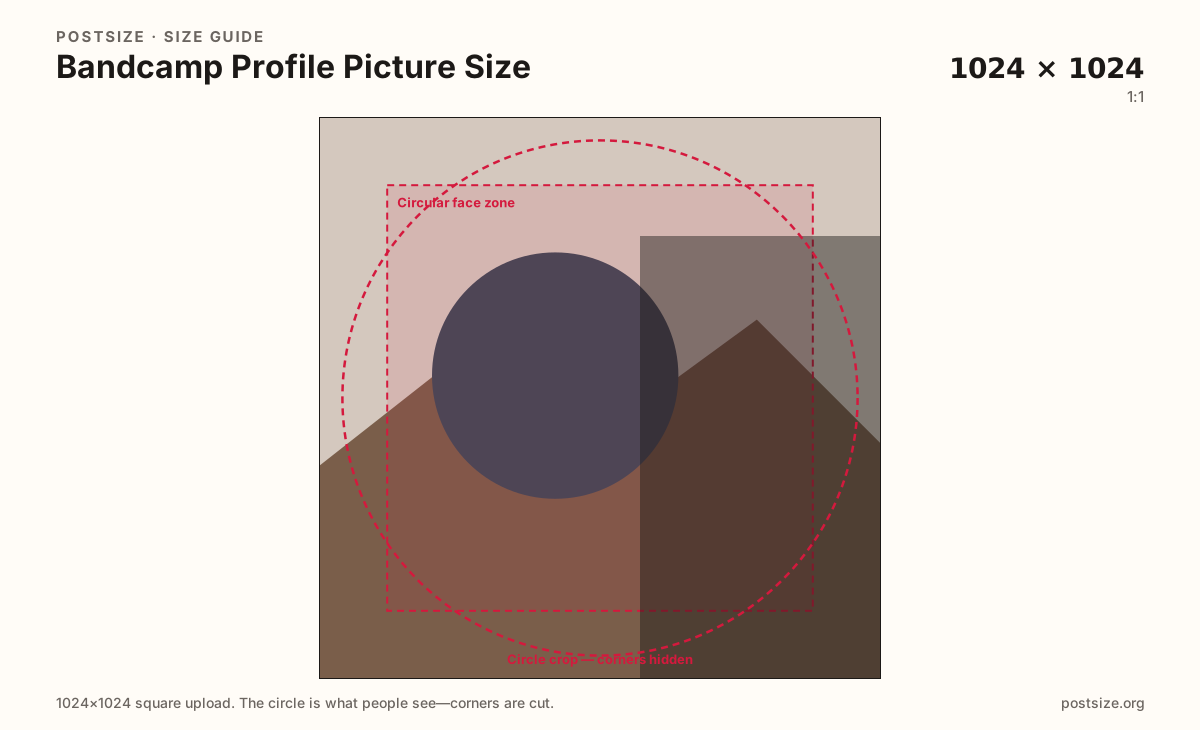
Bandcamp profile photos are practical squares. Export 1024×1024 with the face or mark centered, then download.
Browser crop · stays on your device
1024 × 1024
Add a photo to crop
Upload a face or monogram—or try the sample—then keep the subject inside the circle-safe zone before you download.
This is the profile mark—not the 3000×3000 album jacket. Practical size—preview after upload.
Export this for Bandcamp upload.
1024×1024 1:1
Practical square avatar for Bandcamp artist / label profiles.
Use in tool| Asset | Pixels | Ratio | Notes | Action |
|---|---|---|---|---|
| Profile picture (practical) Recommended | 1024×1024 | 1:1 | Practical square avatar for Bandcamp artist / label profiles. | Use in tool |
Your Bandcamp profile photo appears beside the artist or label name, in follower lists, and next to comments. Album jackets are too detailed for that shrink—fans need a clear face or monogram, not a full release collage.
1024×1024 is a practical clear square. Bandcamp does not always publish one immutable avatar pixel pair, so treat this as a community-ready master and preview after upload. Rounded masks can soft-crop corners that looked fine in a square editor.
Do not stretch a 3000×3000 album cover into this slot without a dedicated crop. The jacket sells a release; the profile mark identifies the catalog owner. Share brand colors—export separate files.
If you also maintain Spotify artist imagery or Instagram avatars, reuse photography carefully. Re-crop for Bandcamp’s square and check contrast on the storefront’s light chrome.
Same circle mask—corners disappear; design for the tiny comment-size icon.
Tick these off against your crop preview—nothing is saved.
Similar-looking slots often use different ratios—do not reuse one export for all of them.
1024 × 1024
This page. Practical artist / label stamp.
3000 × 3000
Release jacket—separate guide.
Often large square
Re-crop—do not stretch blindly.
Often 320+ square
Start file only—export a Bandcamp master.
| Surface | Typical size | Note |
|---|---|---|
| Profile picture | 1024 × 1024 | This page. Practical artist / label stamp. |
| Album cover | 3000 × 3000 | Release jacket—separate guide. |
| Spotify artist image | Often large square | Re-crop—do not stretch blindly. |
| Instagram avatar | Often 320+ square | Start file only—export a Bandcamp master. |
Creators need a working square even when platforms vary wording. 1024×1024 is sharp enough for modern screens without pretending to be the only official size. Preview after upload and nudge if Bandcamp’s mask crops differently.
Albums want large 3000×3000 masters for storefront tiles. Profiles want a simpler stamp. Reusing the jacket unchanged is the most common Bandcamp branding mistake.
JPG suits photos; PNG suits flat monograms. Prefer sRGB. Export a true square—do not upload a rectangle and hope.
Upload a photo or monogram, keep Profile picture (1024×1024) selected, drag until the subject sits in the circle zone, then download. Cropping stays in the browser.
From this download to a live upload in a few minutes.
Download the 1024×1024 JPG or PNG from the tool.
In Bandcamp, open profile / artist settings and upload the photo.
Open the live profile on a phone and check the stamp beside the name.
If corners clip, tighten the crop and replace.
Export a practical 1024×1024 square. Preview on your live profile—UI masks can round corners.
It is a practical community size, not a single official pixel law. Always preview after upload.
Only with a dedicated crop. Full 3000×3000 jackets are too detailed for the profile stamp—center a face or monogram instead.
No. Covers are large release jackets. Profile pictures are smaller identity stamps.
Yes. This guide includes an in-browser crop—files stay on your device until you download and upload yourself.