
Artist image (Spotify for Artists min)
Recommended750×750 1:1
Minimum square Spotify for Artists expects for the artist image. Keep the face in the rounded/circular zone.
Use in toolSpotify · Image size
The artist profile photo is the rounded face in search, radio, and the artist page. Upload 750×750 through Spotify for Artists, keep the person inside the guide, then download a clean square here first.
Browser crop · stays on your device
750 × 750
Add a photo to crop
Upload a press still—or try the sample—then keep eyes and hair inside the rounded guide. Leave tour dates off the picture.
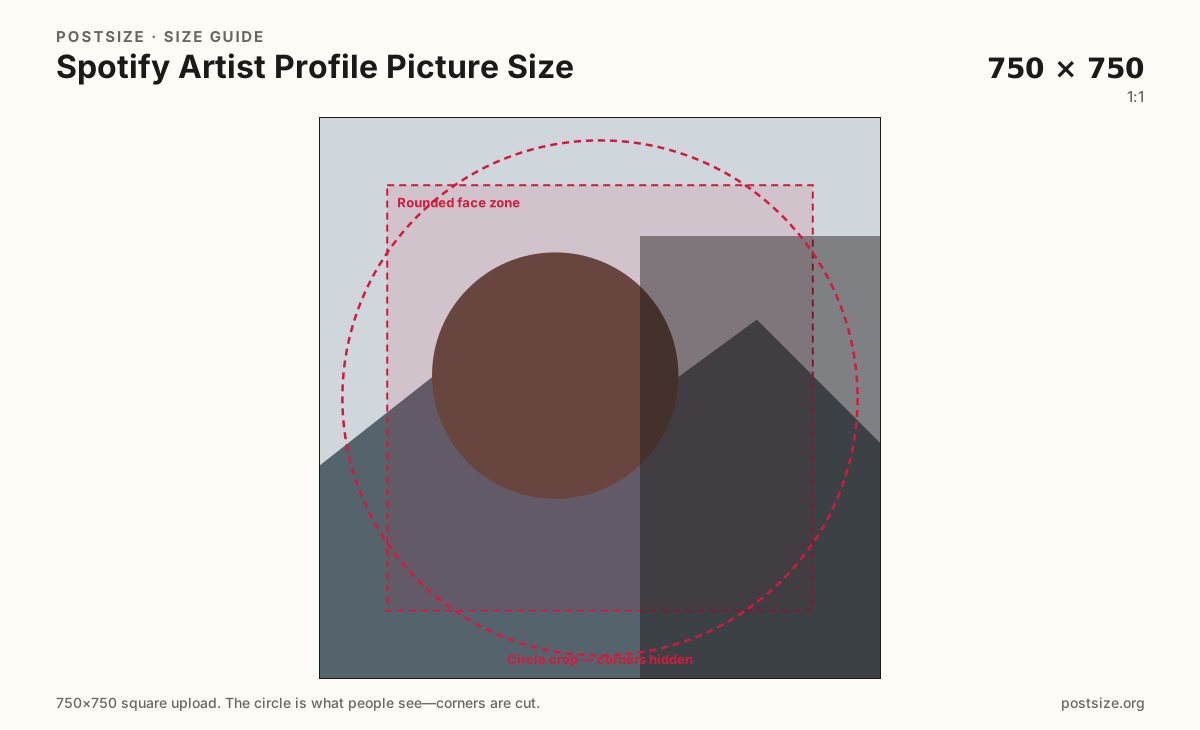
Square upload, rounded display. Spotify for Artists lists 750×750 as the artist-image minimum—corners and rim type will not survive the mask.
Export this for Spotify upload.
750×750 1:1
Minimum square Spotify for Artists expects for the artist image. Keep the face in the rounded/circular zone.
Use in tool| Asset | Pixels | Ratio | Notes | Action |
|---|---|---|---|---|
| Artist image (Spotify for Artists min) Recommended | 750×750 | 1:1 | Minimum square Spotify for Artists expects for the artist image. Keep the face in the rounded/circular zone. | Use in tool |
Listed so you do not confuse them with the size on this page.
690×500 ~1.38:1
Artist-page gallery images are a different upload (≥690×500). Do not treat that landscape as the profile photo.
Not available in the crop tool
| Asset | Pixels | Ratio | Notes | Action |
|---|---|---|---|---|
| Gallery photo (not this slot) Wrong slot | 690×500 | ~1.38:1 | Artist-page gallery images are a different upload (≥690×500). Do not treat that landscape as the profile photo. | — |
Listeners meet the artist image as a chip: search rows, radio tiles, “fans also like,” and the circle (or tightly rounded square) on the artist page beside the header. It is identity, not a flyer. Spotify for Artists is where that file is replaced—there is no consumer-app “edit playlist cover” path for it. Export a true 750×750 square here, then upload in the artist dashboard so the rounded mask is doing work you already previewed.
Spotify for Artists treats gallery photos as a separate stack. Those images sit in the artist-page photo rail and need at least about 690×500. A landscape press shot that looks generous in the gallery will slice a forehead or a second band member when forced into this square. Keep the profile crop tight on one face (or a lockup that still reads as a single mark) and send wide photos to the gallery slot instead.
Image guidelines for the artist profile discourage promotional language on the picture: tour dates, ticket URLs, “new album Friday,” social handles, and watermark forests. Those belong in Concerts, Canvas, or a release campaign—not burned into the face people will see for years. A clean head-and-shoulders (or a strong logo for a faceless project) ages better than a poster that expires after one routing.
Pair this square with the artist header instead of cloning it. The header is a 2660×1140 wide photograph with Play and the artist name sitting on the lower band. Pulling a header still into 750×750 usually leaves a floating torso or a cropped sky. Shoot or select a frame meant to be a portrait, then crop the cinematic still for the header page.
Same circle mask—corners disappear; design for the tiny comment-size icon.
Tick these off against your crop preview—nothing is saved.
Similar-looking slots often use different ratios—do not reuse one export for all of them.
750 × 750 min
This page. Rounded identity in search, radio, and the artist page.
2660 × 1140
Wide page banner—Play and the name sit on the lower portion.
≥690 × 500
Separate Spotify for Artists photos—not the profile square.
1400 × 1400
Listener mix tiles—do not use the artist face as every playlist stamp.
| Surface | Typical size | Note |
|---|---|---|
| Artist profile photo | 750 × 750 min | This page. Rounded identity in search, radio, and the artist page. |
| Artist header | 2660 × 1140 | Wide page banner—Play and the name sit on the lower portion. |
| Gallery images | ≥690 × 500 | Separate Spotify for Artists photos—not the profile square. |
| Playlist cover | 1400 × 1400 | Listener mix tiles—do not use the artist face as every playlist stamp. |
Listeners cannot swap this photo from a playlist editor. The artist image lives in Spotify for Artists (or your label’s access). Cropping here first means you are not discovering a clipped chin inside the dashboard’s small preview.
Team access matters: only users with profile permissions should publish a new face. A merch designer’s square logo and a photographer’s color-graded still are different jobs—agree which one represents the act before you overwrite the live chip.
Gallery images are extra photographs on the artist page. Spotify for Artists asks for a larger minimum on that rail (about 690×500). They can be landscapes, live shots, or studio sets. The profile photo has to survive as a tiny rounded chip—gallery frames do not.
The header is the cinematic strip behind Play. Crop it on the header guide so faces sit in the upper two-thirds. Do not steal a 750×750 portrait, stretch it wide, and call it a header.
JPG is the usual press-photo format. PNG can hold a hard-edged logo for a project that never shows a face. Prefer sRGB. 750×750 is the documented Spotify for Artists minimum—do not upscale a 200px avatar and hope the dashboard accepts the blur.
Upload a portrait, keep Artist image (750×750) selected, drag until eyes sit inside the rounded guide, then download. Processing stays on your device. Upload the file in Spotify for Artists next—not as playlist art.
From this download to a live upload in a few minutes.
Download the 750×750 JPG (or PNG for a flat mark) from the tool.
In Spotify for Artists, open Profile / Images (wording varies) and replace the artist image—not a gallery slot.
Confirm the rounded preview still shows eyes and hair, then save.
Check search and the artist page on a phone, where the chip is small.
If the header now clashes with the new face, recrop the header on its own guide.
Spotify for Artists lists 750×750 as the minimum for the artist image. Upload a square and keep the face inside a rounded/circular safe area.
In Spotify for Artists (profile / images). The listener app’s playlist editor will not change the official artist image.
No. Gallery photos are a different upload and need at least about 690×500. They can be wide. The profile photo is a 750×750 rounded identity chip.
Avoid it. Spotify’s artist-image guidelines steer you away from promotional text, URLs, and handles on the photo. Keep the face clean; put campaigns in other tools.
You upload a square. Many surfaces draw a circle or a tightly rounded square from the center, so corners disappear. Use the rounded face zone on this page.
JPG for photographs, PNG for a flat project mark. Prefer sRGB. Start from a clear 750×750—not an upscaled thumbnail.
Coordinate wardrobe and color if you like, but export two files. The header is 2660×1140 with Play UI on the lower band; this photo is a 750×750 portrait.
A larger square can be a cleaner master, but crop to the 750×750 framing Spotify for Artists expects and check the rounded preview before you publish.