
Artist header (official min)
Recommended2660×1140 7:3
Spotify for Artists minimum canvas (~7:3). Outer atmosphere can bleed; protect faces in the upper two-thirds.
Use in toolSpotify · Image size
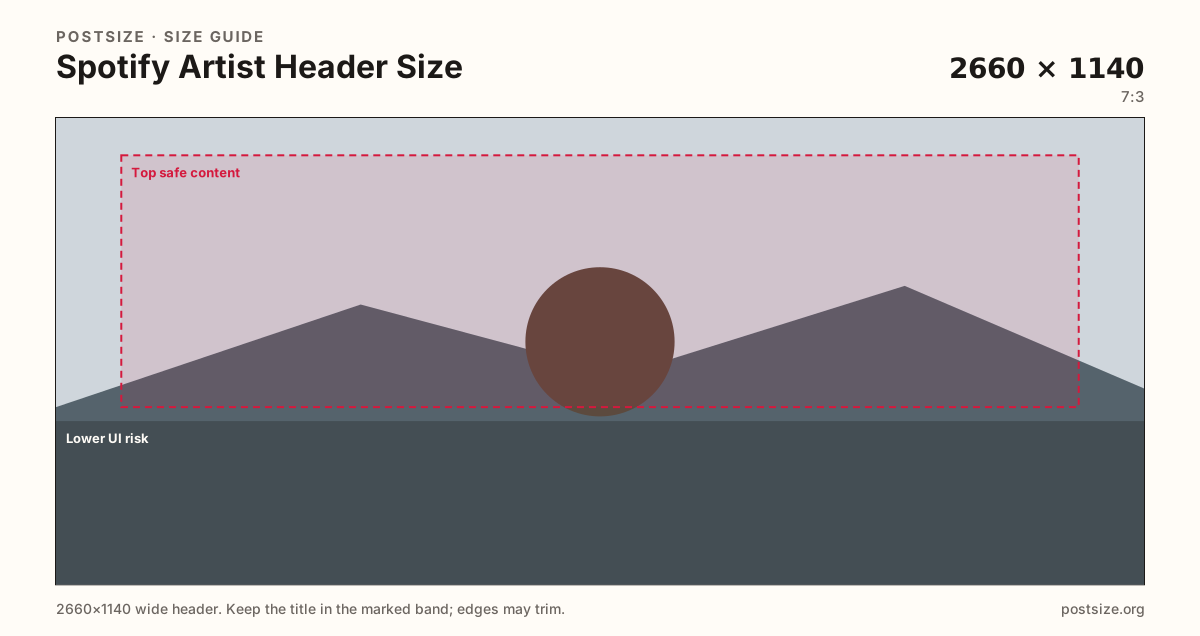
The artist header is a wide 2660×1140 photograph behind the name and Play. Keep faces in the upper band, leave the lower ~35% quieter for UI, then download in your browser.
Browser crop · stays on your device
2660 × 1140
Add a photo to crop
Upload a wide still—or try the sample—then park faces in the top safe band. The lower strip is for name and Play, not the only portrait.
Upload 2660×1140. The lower band is not empty—it is where the artist name, monthly listeners, Follow, and Play sit. Design the top; calm the bottom.
Export this for Spotify upload.
2660×1140 7:3
Spotify for Artists minimum canvas (~7:3). Outer atmosphere can bleed; protect faces in the upper two-thirds.
Use in tool| Asset | Pixels | Ratio | Notes | Action |
|---|---|---|---|---|
| Artist header (official min) Recommended | 2660×1140 | 7:3 | Spotify for Artists minimum canvas (~7:3). Outer atmosphere can bleed; protect faces in the upper two-thirds. | Use in tool |
On the artist page, Spotify does not show a clean billboard. It draws the artist name, listener counts, Follow, and a large Play control across the lower portion of the header. A face parked in that lower ~35% looks like it is wearing the UI. Official guidance still starts at 2660×1140 (~7:3)—large enough for desktop theater—but the usable photograph is the upper two-thirds, not the full frame you see in a design tool.
Phones crop more aggressively than a studio monitor. They keep the cinematic width in spirit, then pile type and buttons onto the same lower band. That is why this page does not pretend to be a Facebook-style dual desktop/mobile cover preview. One official canvas, one honest risk strip: put eyes, instruments, and wordmarks in the top safe content inset, and treat the bottom as atmosphere (blur, sky, stage light) that can accept type.
This is not a playlist cover. Playlist art is a square stamp in Your Library; stretching 1400×1400 across 2660×1140 letterboxes the mix tile and leaves empty curtains Spotify will still cover with Play. It is also not a Twitch channel banner. Twitch’s common 1200×480 strip is shorter and wider in habit, with side-trim risk instead of a name-and-Play stack. Reuse the photo, not the finished Twitch or playlist export.
Spotify for Artists is the upload door. Image rules that apply to the artist profile photo still matter here: skip ticket URLs and “on sale” lines burned into the sky. A header that looks like a festival ad will feel dated the week the routing ends. Pick a still that can live behind Play for a full campaign cycle, then swap when the era actually changes.
Same header strip—keep the avatar pocket clear and the subject in the open band.
Tick these off against your crop preview—nothing is saved.
Similar-looking slots often use different ratios—do not reuse one export for all of them.
2660 × 1140
This page. Wide artist-page photograph with Play UI on the lower band.
750 × 750 min
Rounded chip—crop it separately; do not slice it from this panorama.
1400 × 1400
Square library stamp—wrong ratio for this stage.
1200 × 480
A different wide strip with side trim—not a Spotify header.
| Surface | Typical size | Note |
|---|---|---|
| Artist header | 2660 × 1140 | This page. Wide artist-page photograph with Play UI on the lower band. |
| Artist profile photo | 750 × 750 min | Rounded chip—crop it separately; do not slice it from this panorama. |
| Playlist cover | 1400 × 1400 | Square library stamp—wrong ratio for this stage. |
| Twitch channel banner | 1200 × 480 | A different wide strip with side trim—not a Spotify header. |
Think of the header as a still from a video that already has burned-in captions—except the captions belong to Spotify. The lower UI risk guide (from 65% down) is where those captions live. Soft gradients, out-of-focus crowds, and stage floors work there. Eyes do not.
Monthly listener counts and Follow change width with language and numbers. Do not place the only wordmark at a precise lower-left coordinate and assume it will miss the UI in every market.
A 7:3 frame is shorter than a YouTube 16:9 banner and taller than a Twitch 1200×480 strip. Group shots with everyone standing on the baseline will lose heads to Play or lose feet to the crop. Place the ensemble in the upper band and give the bottom to light and color.
Bleed the photograph to every edge. The safe inset is for the message, not for adding letterbox bars. Bars look like a playlist square that was never recropped.
JPG is the usual choice for photography. PNG can hold a designed graphic header, but photography reads more like an artist page. Prefer sRGB. 2660×1140 is the official minimum—do not upscale a Twitch banner and call it done.
Upload a wide still, keep Artist header (2660×1140) selected, drag until faces sit in the top safe content band and clear the lower UI risk, then download. Cropping stays in the browser. This tool does not show a Facebook-style desktop vs mobile split—judge the live artist page after you publish.
From this download to a live upload in a few minutes.
Download the 2660×1140 JPG (or PNG for a flat graphic) from the tool.
In Spotify for Artists, replace the header image (profile / images—wording varies).
In the dashboard preview, confirm the name and Play sit on empty atmosphere, not on a face.
Open the public artist page on desktop, then on a phone, and check the lower band again.
If a chin or title is under the controls, recrop with more bottom inset and upload again.
2660×1140 pixels (~7:3) is the official Spotify for Artists minimum. Keep important faces in the upper two-thirds.
The artist name, listener counts, Follow, and Play sit on the lower ~35%. Move faces into the top safe band and leave that strip calmer.
No. Playlist covers are squares for Your Library. Stretching them into 2660×1140 creates empty sides and the wrong subject.
Not as-is. Twitch’s usual channel banner is 1200×480 with side-trim risk. Recrop from the original photo to 2660×1140 and re-check the lower UI band.
Upper two-thirds. If the eyes fall into the lower UI risk guide (from 65% down), Play and the name will sit on them.
JPG for photographs, PNG for hard-edged graphics. Prefer sRGB and a true 2660×1140 export rather than an upscaled smaller banner.
No. Spotify’s artist header is one official canvas. Preview the live artist page on a phone after upload instead of trusting a dual-cover mock.
Same shoot, two crops. The profile is a rounded portrait; the header is a wide stage with UI on the bottom. Export them separately.