
Spotlight still (practical)
Recommended1080×1920 9:16
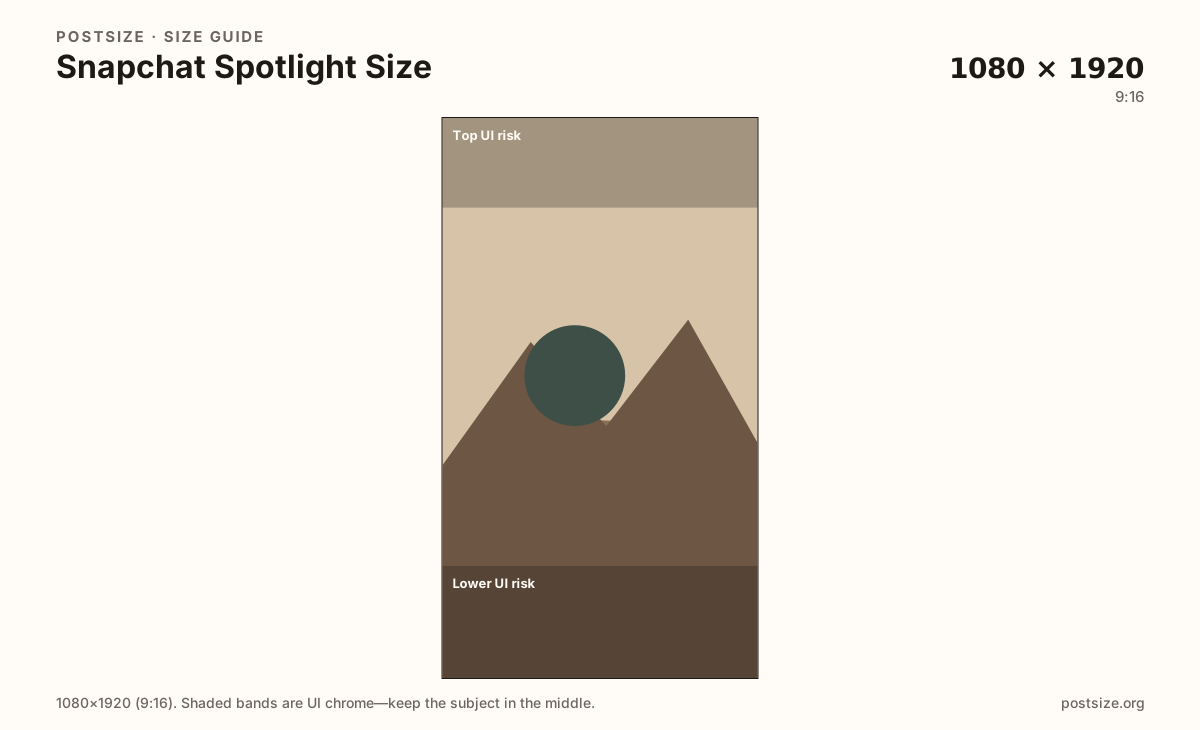
Practical 9:16 Spotlight frame. Protect the mid-band—discovery UI and captions cover edges.
Use in toolSnapchat · Image size
Snapchat Spotlight is full-screen vertical. Export a practical 1080×1920 still with the subject in the mid-frame, then download.
Browser crop · stays on your device
1080 × 1920
Add a photo to crop
Upload a vertical photo or frame grab—or try the sample—then keep faces between the UI risk bands before you download.
This is a Spotlight vertical still—related to Stories at 9:16, but discovery chrome and sound-on browsing differ. Re-check mid-frame clearance.
Export this for Snapchat upload.
1080×1920 9:16
Practical 9:16 Spotlight frame. Protect the mid-band—discovery UI and captions cover edges.
Use in tool| Asset | Pixels | Ratio | Notes | Action |
|---|---|---|---|---|
| Spotlight still (practical) Recommended | 1080×1920 | 9:16 | Practical 9:16 Spotlight frame. Protect the mid-band—discovery UI and captions cover edges. | Use in tool |
Spotlight is Snapchat’s public discovery feed: people swipe vertical clips with sound on, often outdoors. A practical 1080×1920 (9:16) still—or video cover frame—needs a clear mid-frame subject because top and bottom chrome, captions, and engagement controls cover the edges.
Stories use the same 1080×1920 pixels for friends. Spotlight competes with stranger content, so the first second (and any static cover) must read without context. Tiny logos on the rim fail.
TikTok and Reels share 9:16 habits. Reuse footage if you want—then re-check Snapchat’s overlays. Safe zones are similar in spirit, not identical in chrome.
This tool crops stills. Match the same mid-frame rules in your video editor for motion Spotlight posts.
Same full-screen frame—top and bottom UI chrome cover anything glued to the edges.
Tick these off against your crop preview—nothing is saved.
Similar-looking slots often use different ratios—do not reuse one export for all of them.
1080 × 1920
This page. Discovery vertical frame.
1080 × 1920
Friends feed—same pixels, different chrome.
1080 × 1080
Circle avatar—separate square.
1080 × 1920
Similar 9:16—re-export per app.
| Surface | Typical size | Note |
|---|---|---|
| Spotlight still | 1080 × 1920 | This page. Discovery vertical frame. |
| Story | 1080 × 1920 | Friends feed—same pixels, different chrome. |
| Profile picture | 1080 × 1080 | Circle avatar—separate square. |
| TikTok / Reels habit | 1080 × 1920 | Similar 9:16—re-export per app. |
Both are 9:16. Stories are social and ephemeral among friends; Spotlight is public discovery. Design the cover for strangers who owe you zero context.
Spotlight is often watched with sound, yet captions and on-image hooks still matter in noisy places. Pair audio with a visual that works muted for a second.
Still covers: 1080×1920 JPG/PNG sRGB. Video should match 9:16 with the same mid-frame habit. Soft upscales look worse after Snapchat compression.
Upload a vertical frame, keep Spotlight still (1080×1920) selected, drag until the subject sits between the UI risk bands, then download. Cropping stays in the browser.
From this download to a live upload in a few minutes.
Download the 1080×1920 still (or use it as a cover reference in your editor).
Publish to Spotlight in Snapchat with the mid-frame protected in video too.
Preview on a phone with brightness up—outdoor glare is the real test.
If the hook clips under UI, re-center and replace.
A practical vertical still is 1080×1920 (9:16). Keep the subject in the mid-frame away from UI chrome.
Same pixels often, different discovery chrome and audience. Re-check safe zones before publishing.
Reuse the footage, then re-crop and preview on Snapchat. Overlays differ even at 9:16.
We crop still frames. Match the mid-frame safe zone in your video editor for motion posts.
Yes. In-browser crop—files stay on your device until you download and publish in Snapchat.