
Publication logo (recommended)
Recommended1000×1000 1:1
Clear square master for Medium publication branding. Keep the mark inside the circle-safe zone.
Use in toolMedium · Image size
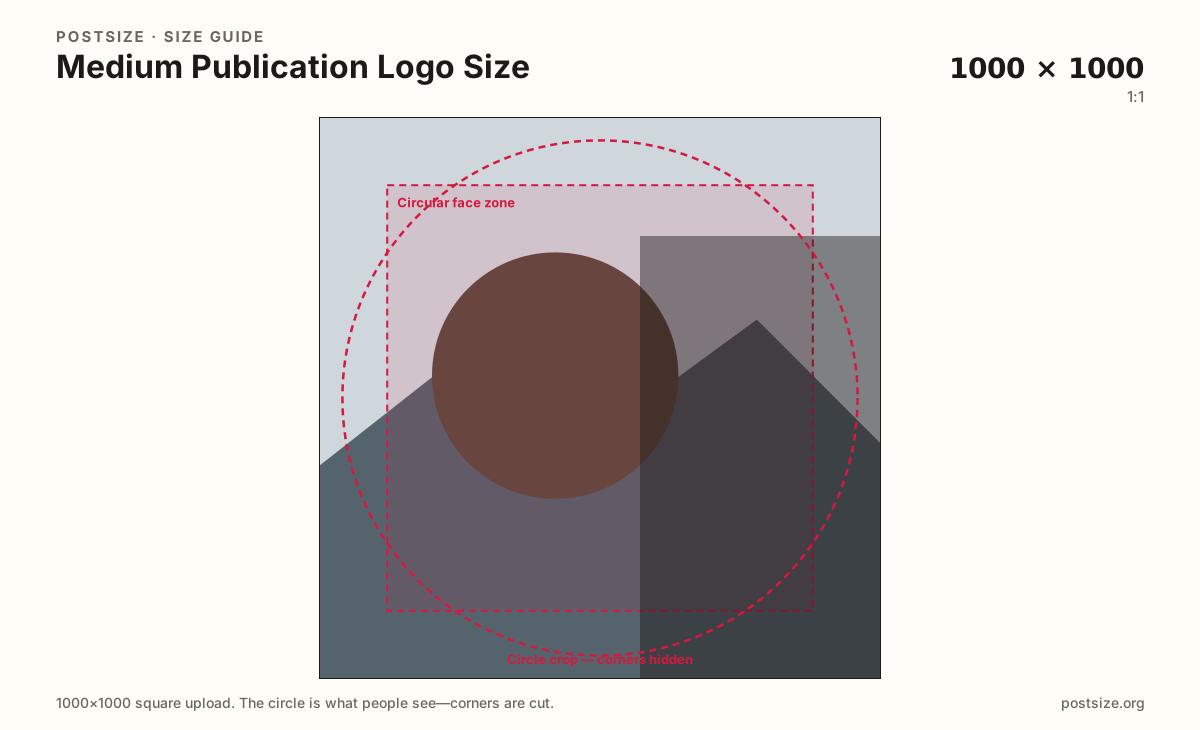
Medium publication logos upload as squares and often display small beside the name. Export 1000×1000 (or a practical 400×400), keep the mark centered, then download.
Browser crop · stays on your device
1000 × 1000
Add a photo to crop
Upload a logo or monogram—or try the sample—then keep the mark inside the circle-safe zone before you download.
This is the publication mark—not the article Open Graph image. Prefer 1000×1000; 400×400 is a lighter practical option.
Export this for Medium upload.
1000×1000 1:1
Clear square master for Medium publication branding. Keep the mark inside the circle-safe zone.
Use in tool400×400 1:1
Practical lighter upload when the mark is bold. Prefer 1000×1000 when the source is sharp.
Use in tool| Asset | Pixels | Ratio | Notes | Action |
|---|---|---|---|---|
| Publication logo (recommended) Recommended | 1000×1000 | 1:1 | Clear square master for Medium publication branding. Keep the mark inside the circle-safe zone. | Use in tool |
| Lighter square | 400×400 | 1:1 | Practical lighter upload when the mark is bold. Prefer 1000×1000 when the source is sharp. | Use in tool |
Medium publications show a logo beside the name on the publication home, in story bylines, and in lists of publications someone follows. That mark is judged at stamp size—not as a full-bleed hero. Corners disappear if the UI applies a rounded or circular mask.
1000×1000 gives you a clear master for rebrands and retina displays. 400×400 is a practical lighter square when the mark is already bold and simple. Soft wordmarks with hairline serifs fail either way once Medium shrinks them next to the title.
Do not paste a 1200×628 OG card into this slot. Article social images are wide share cards for X, Facebook, and Slack unfurls. Stretching an editorial photo into a logo looks unfinished next to crisp monograms.
Keep one identity across publication chrome and author avatars when you can, but export each surface separately. A personal writer photo is not the same job as a publication wordmark—even when both are squares.
Same circle mask—corners disappear; design for the tiny comment-size icon.
Tick these off against your crop preview—nothing is saved.
Similar-looking slots often use different ratios—do not reuse one export for all of them.
1000 × 1000
This page. Recommended master.
400 × 400
Practical alternate when the mark is bold.
1200 × 628
Wide share card—separate guide.
Square photo
Personal face—not publication branding.
| Surface | Typical size | Note |
|---|---|---|
| Publication logo | 1000 × 1000 | This page. Recommended master. |
| Lighter logo | 400 × 400 | Practical alternate when the mark is bold. |
| Article OG image | 1200 × 628 | Wide share card—separate guide. |
| Writer avatar | Square photo | Personal face—not publication branding. |
The logo is a square identity mark. The OG image is a wide ~1200×628 card used when someone shares a story. They share brand colors—not a crop.
Design the logo for tiny chrome first. Design the OG card for a headline and one photo. Reusing either file in the wrong slot is the most common Medium branding mistake.
Medium often rounds the publication mark. Anything parked in the extreme corners can vanish. Center a monogram, icon, or short wordmark inside the safe zone and leave breathing room.
PNG suits flat logos and transparency needs; JPG suits photo-based marks. Prefer sRGB. Keep weight reasonable—publication settings are not a place for 20MB masters.
Upload a logo, keep Publication logo (1000×1000) selected unless you need the lighter square, drag until the mark sits in the circle zone, then download. Cropping stays in the browser.
From this download to a live upload in a few minutes.
Download the 1000×1000 JPG or PNG (or 400×400 if you chose the lighter preset).
In Medium, open publication settings and upload the logo for the publication.
Preview the publication home and a story byline on a phone.
If corners clip or the mark muddies, simplify and re-export.
A square—1000×1000 recommended. 400×400 is a practical lighter option when the mark is already bold.
No. Logos are squares for publication chrome. Article OG images are wide ~1200×628 social cards.
Often with rounded or circular masks. Keep critical detail inside the circle-safe zone on this page.
Only if the publication identity is intentionally a face mark. Most publications need a distinct logo—export separately either way.
Yes. This guide includes an in-browser crop—files stay on your device until you download and upload to Medium yourself.