
Highlight cover (recommended)
Recommended1080×1080 1:1
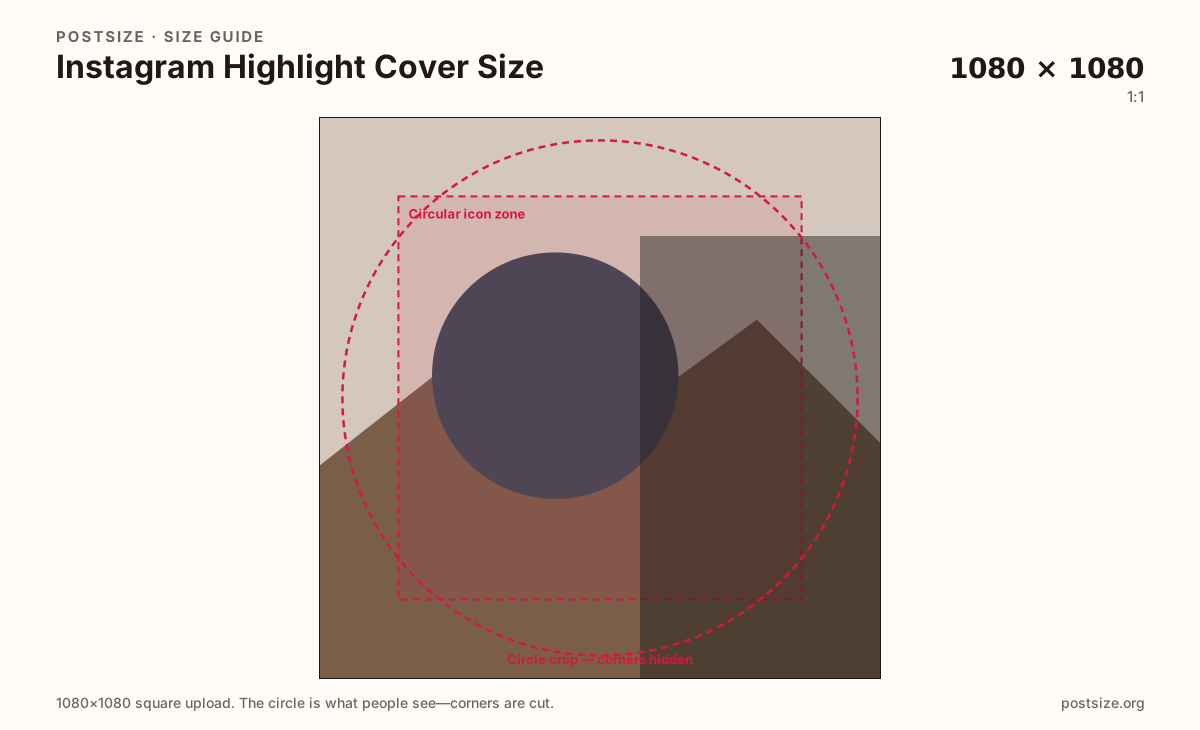
Clear square master. Instagram masks a circle for the highlight row—corners disappear.
Use in toolInstagram · Image size
Highlight covers are the circular icons under your profile bio. Export a clear 1080×1080 square, keep the icon centered inside the circle, then download without leaving this page.
Browser crop · stays on your device
1080 × 1080
Add a photo to crop
Upload an icon or photo—or try the sample—then drag so the mark stays inside the circle guide. Prefer 1080×1080 for a clear set.
Always start from a square. The highlight row draws a small circle—design the icon for tiny size first, then keep it centered in the guide.
Export this for Instagram upload.
1080×1080 1:1
Clear square master. Instagram masks a circle for the highlight row—corners disappear.
Use in tool| Asset | Pixels | Ratio | Notes | Action |
|---|---|---|---|---|
| Highlight cover (recommended) Recommended | 1080×1080 | 1:1 | Clear square master. Instagram masks a circle for the highlight row—corners disappear. | Use in tool |
Reference sizes and crops—not always separate upload files.
640×640 1:1
Same circle logic at a lighter pixel count. Prefer 1080×1080 when the icon has fine detail.
Use in tool| Asset | Pixels | Ratio | Notes | Action |
|---|---|---|---|---|
| Compact square | 640×640 | 1:1 | Same circle logic at a lighter pixel count. Prefer 1080×1080 when the icon has fine detail. | Use in tool |
Instagram Highlights pin Stories under your profile as a horizontal row of circles. Each cover is a branding chip—not a full Story frame. Viewers often see them at a size closer to a comment avatar than a feed post.
You upload a square (1080×1080 is a safe master). Instagram then masks a circle. Anything in the corners vanishes. Wide wordmarks, text stuck on the rim, or a full 9:16 Story still squeezed into the slot usually fail.
A coherent set beats one perfect cover. Same background treatment, same stroke weight, same icon style across Highlights makes the profile look intentional. Mixed photos, screenshots, and random stickers look like unfinished Stories leftovers.
Highlight covers are not your profile picture and not a feed post. Reuse a symbol from your brand kit if you want—but export a centered circular-safe crop instead of stretching a Reel thumbnail.
Same circle mask—corners disappear; design for the tiny comment-size icon.
Tick these off against your crop preview—nothing is saved.
Similar-looking slots often use different ratios—do not reuse one export for all of them.
1080 × 1080 → circle
This page. Icons under the bio.
640 × 640 → circle
Avatar above the grid—different file, same circle logic.
1080 × 1920
Full-screen vertical—not a highlight icon.
1080 × 1350
Rectangular feed crop—do not reuse as a cover icon.
| Surface | Typical size | Note |
|---|---|---|
| Highlight cover | 1080 × 1080 → circle | This page. Icons under the bio. |
| Profile picture | 640 × 640 → circle | Avatar above the grid—different file, same circle logic. |
| Story / Reels still | 1080 × 1920 | Full-screen vertical—not a highlight icon. |
| Feed post | 1080 × 1350 | Rectangular feed crop—do not reuse as a cover icon. |
Treat covers like app icons: one background system, one line weight, one illustration style. Five mismatched photos feel accidental; five related icons feel like a brand.
If you use text, keep it to one or two short words max and place them fully inside the circle. Fine serif paragraphs will disappear at profile size.
Center the mark slightly optically—circles feel tighter than squares. Leave breathing room; thick strokes that touch the rim look clipped after Instagram’s mask.
Photo covers can work for personal brands if the face or object fills the circle. Group shots and wide landscapes usually shrink into noise.
PNG is popular for flat icons with hard edges; JPG works for photo-based covers. Prefer sRGB. A clean 1080×1080 file usually survives Instagram’s compression better than a tiny upscaled sticker.
Upload your icon art, choose Highlight cover (1080×1080), drag until the mark sits inside the circular guide, then download. Repeat with the same framing for the rest of the set.
From this download to a live upload in a few minutes.
Download the square JPG or PNG from the tool (prefer 1080×1080).
On Instagram, open the Highlight → Edit Highlight → Edit Cover.
Upload the file and center the icon in Instagram’s circle preview.
Repeat for each Highlight so the row matches.
Check the profile on your phone—icons should still read in the small row.
Export a square—1080×1080 is a strong master. Instagram displays Highlights as circles under your bio, so keep the icon inside the circular safe area.
Yes. Corners of the square disappear. Center the symbol and avoid text that only lives on the rim.
You can pick a Story frame, but re-crop to a centered square icon. A full 9:16 still usually looks messy in the tiny circle.
A shared background and icon style reads as intentional. Random mismatched photos look unfinished on the profile row.
PNG for flat icons with hard edges; JPG for photo-based covers. Prefer sRGB either way.
Both are circles, but they are different files and jobs. The profile photo is your identity; Highlights are a labeled icon row. See the Surfaces table.
Usually the mark sat too close to the edge, or a tiny source was upscaled. Re-export a clear 1080×1080 with padding inside the circle guide.